 English
  Français
 Deutsch
 Español
 Italiano
 Nederlands
 Português
 Русский
 中文 (中国)
 한국어
한국어 日本語
日本語 Svenska
Three pedal sets: T3PA Add-On ; T3PA Pro Add-On ; T-LCM Pedals ; T3PM
Two pedal sets: T2PA ; T2PM
Scalable pedal set: Raceline Pedals LTE ; Raceline Pedals III
This article shows how you can test your Thrustmaster pedal set.
If you notice a malfunction on your pedal set, you will need to close your game to perform the test. Also, whether you play on a PC or game console, you must perform a test on a PC running Windows® 10 or more recent.
Contents:
1.1. My Thrustmaster Panel for compatible racing wheel bases (T818, T598, T248R)
1.2. Control Panel for FFB racing wheel bases (T128; TMX; T150; T248; T300; TX; T‑GT; T‑GT II; TS‑XW; TS‑PC)
1.4. Bungee Cord Wheels (T98 with T2PM; T80 with T2PA)
2. Game console test (PlayStation et Xbox)
1. PC test (Windows 10/11)
The tests below require a PC running Windows 10/11 or a more recent version. You will need to connect your pedal set to your wheel base using its RJ12 connector.
Exception: some pedal sets can be tested on a PC either with the wheel base or on their own in standalone mode.
- The T-LCM Pedals can be tested either on their own or with the wheel base (see link in section 1.4).
- The T3PA and T3PM models can be tested either when connected to the racing wheel base or independently using the T.RJ12 USB Adapter.
1.1. My Thrustmaster Panel for compatible racing wheel bases (T818, T598, T248R)
Testing in My Thrustmaster Panel can only be performed with a racing wheel model compatible with this application (T818, T598, T248R).
You must connect your pedal set to the wheel base using its RJ12 connector.
Important: If you have a T818 or a T598, you must install a wheel add-on on the base; otherwise, the test will not work.
Connect the wheel to a USB port on the PC (make sure the T818 or T598 is powered on).
- If you have a T248R, let it fully calibrate until the LCD screen displays T248R.
- If you have a T818 or T598, wait a few seconds until the power LED becomes steady.
Open My Thrustmaster Panel, click the icon of your wheel base:
- go to TESTING
- the pedal axes are displayed under AXIS, in the PEDALS section
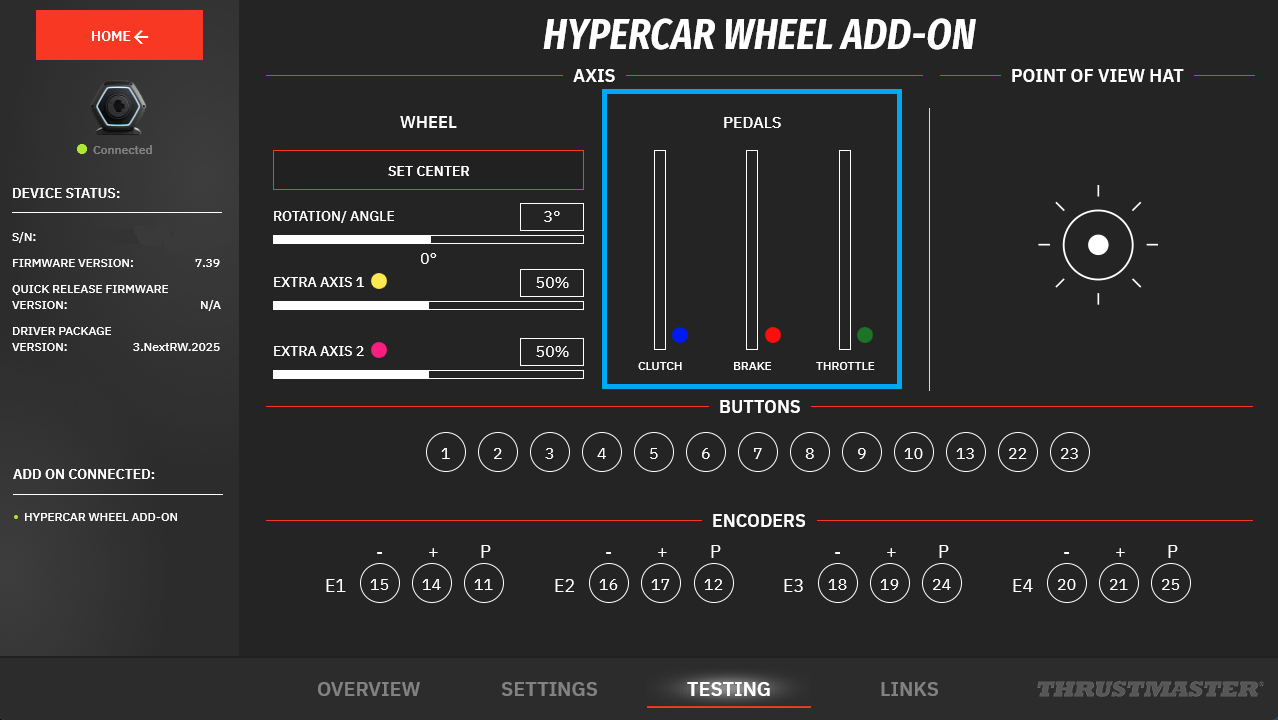
Test your pedal set.
1.2. Control Panel for FFB racing wheel bases (T128; TMX; T150; T248; T300; TX; T‑GT; T‑GT II; TS‑XW; TS‑PC)
This test applies to force feedback wheel bases (T128, T150, TMX, T248 [except T248R], T300, TX, T‑GT/T‑GT II, TS‑XW, TS‑PC).
Make sure your PC has the latest available driver for your wheel. If needed, you will find the link to the latest PC - DRIVERS FORCE FEEDBACK [TTRS] driver in the “Drivers” section on your wheel’s product page.
Restart your PC to validate the installation.
Connect your pedal set to your wheel base using the RJ12 connector.
- Connect your wheel to your PC’s USB port and let it calibrate.
- Wait a few seconds, then open the Control Panel.
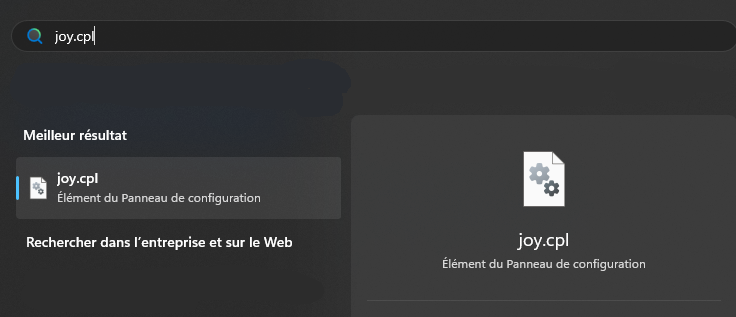
Click the Windows search icon on your PC’s taskbar, type joy.cpl, then click to open the application.
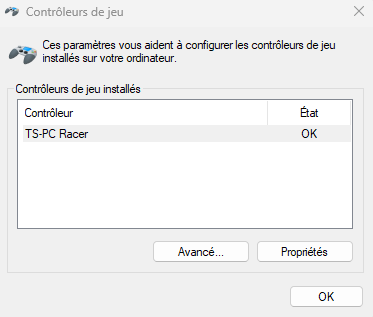
The Game Controllers window opens: select the name of your wheel, then click Properties.
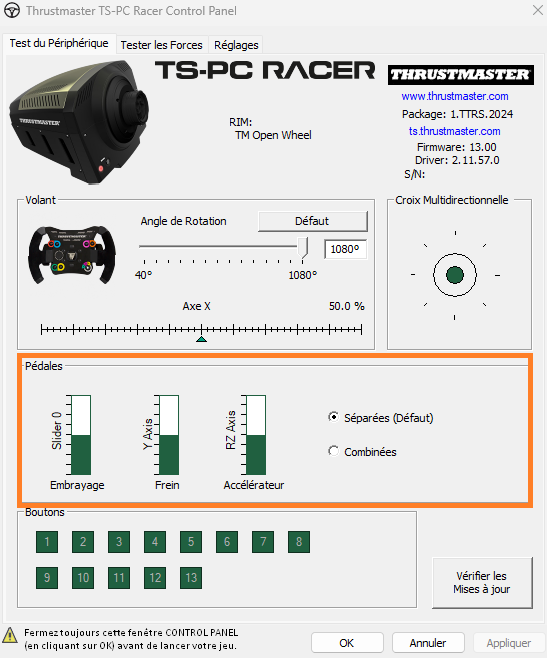
Test the pedals and check whether the behaviour of your pedal set is consistent.
1.3. T LCM Pedals
The T-LCM Pedals requires the use of its calibration software to be tested effectively on a PC. However, it is possible to test it when connected to the steering wheel base.
Please see our article dedicated to testing T-LCM Pedals:
- Recommendations for testing or adjusting the T-LCM Pedals
1.4. Bungee Cord Wheels (T98 with T2PM; T80 with T2PA)
The T98 Ferrari 296 GTB (PS4/PS5/PC) and the T98 Ferrari 296 GTS (Xbox One/Xbox Series/PC) can be tested on a PC with their T2PM pedal set. They do not require any driver.
- Guide for testing the T98 on PC
The T80 Ferrari 488 GTB Edition and the T80 Racing Wheel can be tested on a PC with a T2PA pedal set connected using the RJ12 connector.
- Guide for testing the T80 on PC
Important:
The Ferrari 458 Spider Racing Wheel is only compatible with Xbox consoles. It does not have a PC driver or a Control Panel.
To test this wheel, please refer to the next section dedicated to Xbox consoles.
2. Game console test (PlayStation and Xbox)
If you don't have a PC, here are our recommendations for testing your pedal set on a game console.
Reminder: on game consoles, the pedal set must only be connected to the racing wheel base via its RJ12 connector.
2.1 Xbox consoles
On Xbox One™, Xbox Series X™, and Xbox Series S™ consoles you can test your racing wheel and pedals, even without using the game.
First, test your racing wheel and pedals again in your game. If possible, try this in multiple games to see if the pedals behavior repeats.
On Xbox Series X™ and Xbox Series S™ consoles, make sure Quick Resume is turned off.
Then quit the game and follow our tips for testing racing wheels on an Xbox console with Wheel Tester.
2.2 PlayStation consoles
On PlayStation®4 and PlayStation®5 consoles, you will need to test your racing wheel and pedals in-game, and ideally in different games, to see if the pedals behavior repeats.