English
  Français
 Deutsch
 Español
 Italiano
 Nederlands
 Português
 Русский
 中文 (中国)
 한국어
한국어 日本語
日本語 Svenska
 Türkçe
Product: Formula Wheel Add-On Ferrari SF1000 Edition ; Ferrari 488 GT3 Wheel Add-On ; Evo Racing Hub (EVO Racing 32R, 31U, 31D)
System requirements: PC running Windows® 10 or more recent.
Thrustmaster new generation wheel add-ons are now recognized through a standard protocol by Thrustmaster dual-belt servo bases.
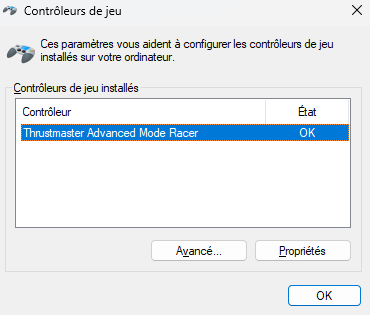
On PC, the servo bases mounted with these new wheel add-ons are recognized with the name Thrustmaster Advanced Mode Racer.
Note:
Older Thrustmaster wheel add-on models (those released before the models referenced in this article) still allow the name of the servo base to be displayed on PC and the steering wheel image to be shown in the control panel.
Important note regarding servo bases:
It is necessary that your PC has the latest "PC - DRIVERS FORCE FEEDBACK" driver installed and that your Thrustmaster servo base has its latest firmware (for PC and game consoles) in order to fully support your wheel add-on.
If necessary, the driver and the firmware update procedure are available on your servo base page.
Concerned servo bases:
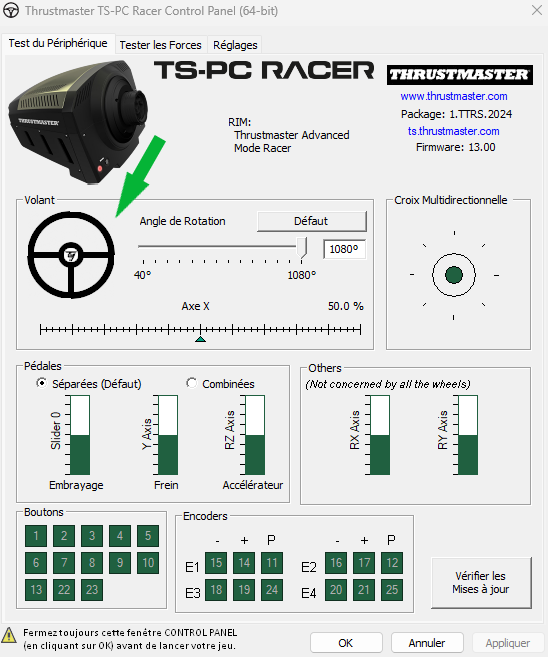
Below we show the example of a TS-PC Racer equipped with a Formula Wheel Add-On Ferrari SF1000 Edition (the display will be identical for newer wheel add-on models).
1. Open the control panel
Connect your Thrustmaster racing wheel to the USB port on your PC, wait a few seconds then follow the instructions:
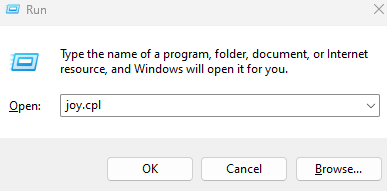
On your keyboard, simultaneously press the Windows and R keys
The Run window appears: type joy.cpl then click OK.
Select the name Thrustmaster Advanced Mode Racer then click Properties.
2. View your racing wheel and its wheel add-on in the control panel
The new generation Thrustmaster wheel add-on (in this example a Formula Wheel Add-On Ferrari SF1000 Edition) appears in the shape of a standard steering wheel.