 한국어
한국어  Français
 English
 Deutsch
 Español
 Italiano
 Nederlands
 Português
 Русский
 中文 (中国)
 日本語
日本語 Svenska
 Türkçe
경고
Your wheel’s Firmware version appears in the top right in the Control Panel’s tabs. Firmware: 34 is the latest version.
자세히 보기
자세히 보기
매뉴얼
펌웨어
 Firmware T300 series - Update Procedure [System Requirement: Windows® 10 / 11]PC
 릴리즈 노트 - Firmware T300 series - Update Procedure [System Requirement: Windows® 10 / 11]
- New: Important note about the new firmware (now handles & detects differently the type of pedal set connected via RJ12)PC PS4™ Xbox One™
버튼 매핑
- Button mapping - T300RSPC PS3™ PS4™
-
 FERRARI 458 CHALLENGE WHEEL - “PC” GENERIC MAPPINGPC
 -
FERRARI 458 CHALLENGE WHEEL - PlayStation® GENERIC MAPPINGPS3™ PS4™
-
 FERRARI 599XX EVO 30 ALCANTARA® WHEEL - “PC” GENERIC MAPPINGPC
 -
FERRARI 599XX EVO 30 ALCANTARA® WHEEL - PlayStation® GENERIC MAPPINGPS4™ PlayStation®5
-
FERRARI F1 WHEEL - “PC” ADVANCED MAPPINGPC
-
FERRARI F1 WHEEL - “PC” GENERIC MAPPING PC
-
FERRARI F1 WHEEL - PlayStation® GENERIC MAPPING PS4™ PlayStation®5
-
GT WHEEL - “PC” GENERIC MAPPING PC
-
GT WHEEL - PlayStation® GENERIC MAPPING PS3™ PS4™
-
PC - GENERIC MAPPING – Ferrari 488 GT3 Wheel Add-on PC
-
PS4™ / PS5™ - GENERIC MAPPING – Ferrari 488 GT3 Wheel Add-onPS4™ PlayStation®5
-
TM LEATHER 28 GT WHEEL - “PC” GENERIC MAPPINGPC
-
TM LEATHER 28 GT WHEEL - PlayStation® GENERIC MAPPINGPS4™ PlayStation®5
-
TM Open Wheel - PC GENERIC MAPPINGPC PS4™ Xbox One™
-
TM Open Wheel - PS5-PS4 GENERIC MAPPINGPC PS4™ PlayStation®5 Xbox One™
-
TM Sparco® Wheels - “PC” GENERIC MAPPINGPC PS4™ Xbox One™
-
TM Sparco® Wheels - PS5-PS4 GENERIC MAPPINGPC PS4™ PlayStation®5 Xbox One™
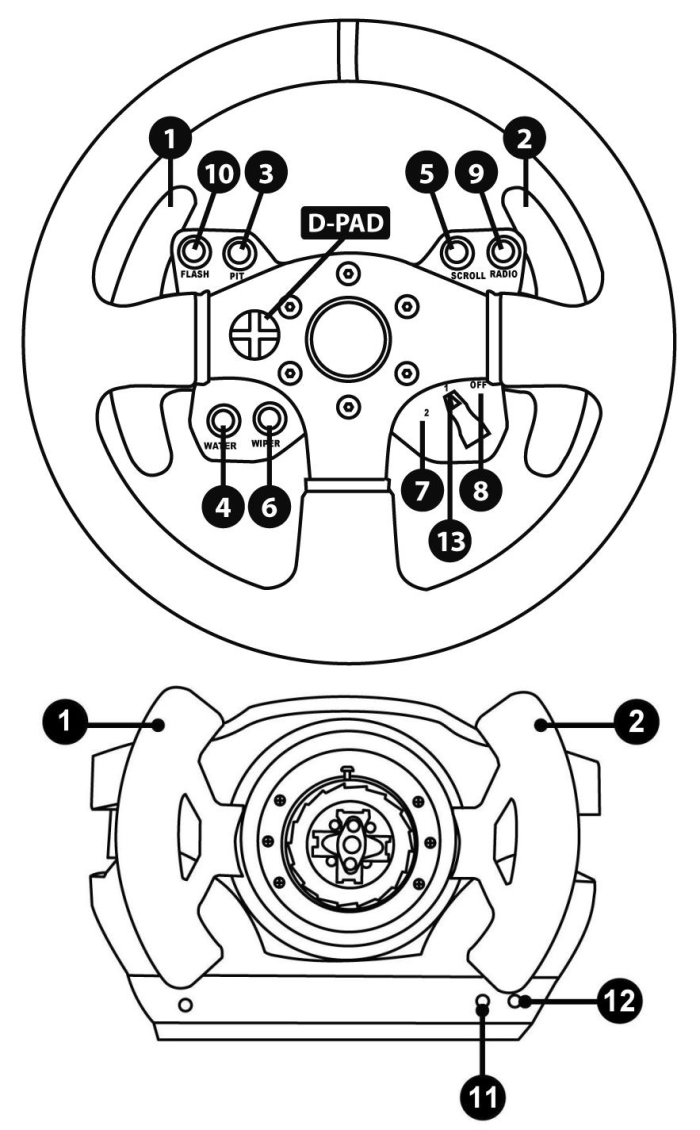
FERRARI 458 CHALLENGE WHEEL - “PC” GENERIC MAPPING
PC
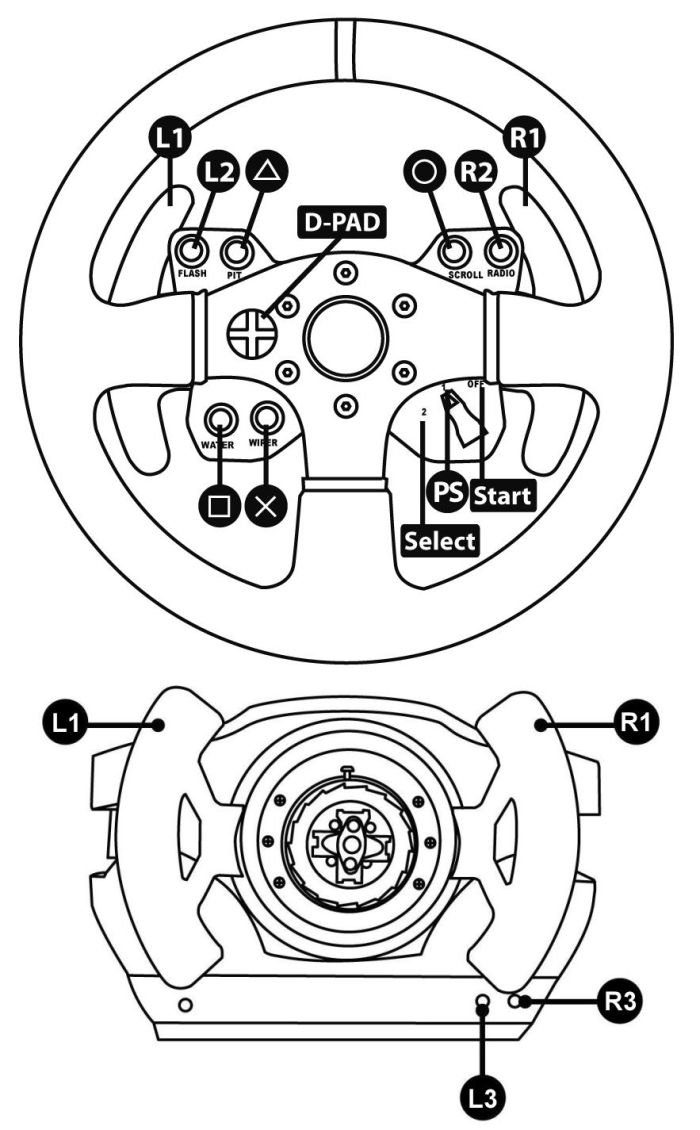
FERRARI 458 CHALLENGE WHEEL - PlayStation® GENERIC MAPPING
PS3™ PS4™
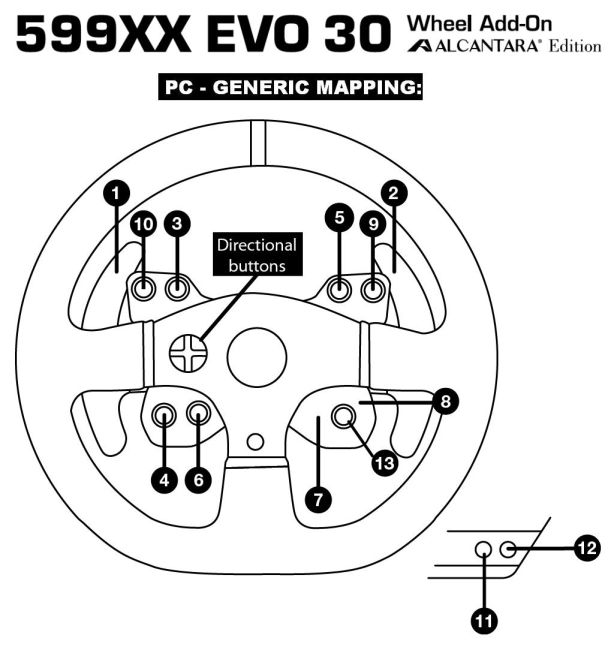
FERRARI 599XX EVO 30 ALCANTARA® WHEEL - “PC” GENERIC MAPPING
PC
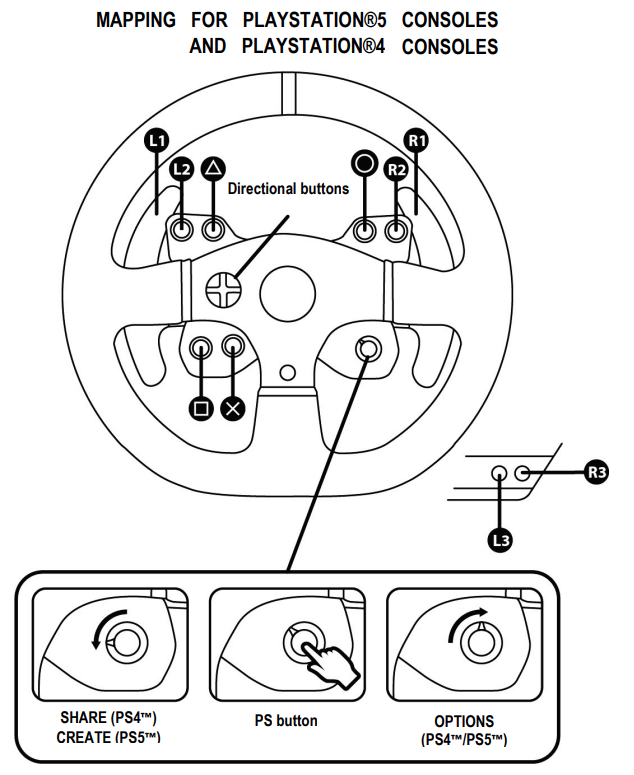
FERRARI 599XX EVO 30 ALCANTARA® WHEEL - PlayStation® GENERIC MAPPING
PS4™ PlayStation®5
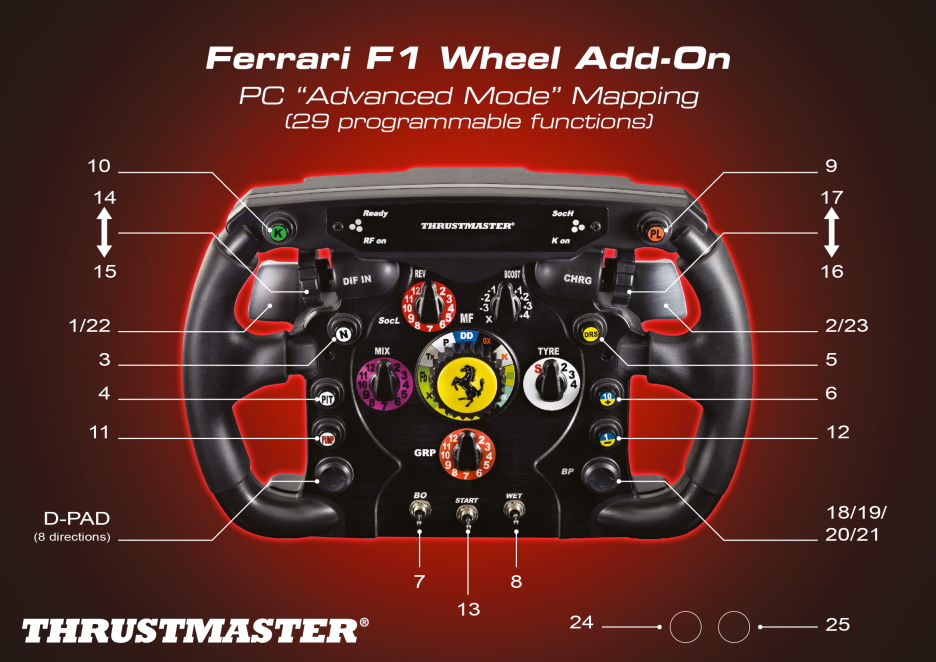
FERRARI F1 WHEEL - “PC” ADVANCED MAPPING
PC
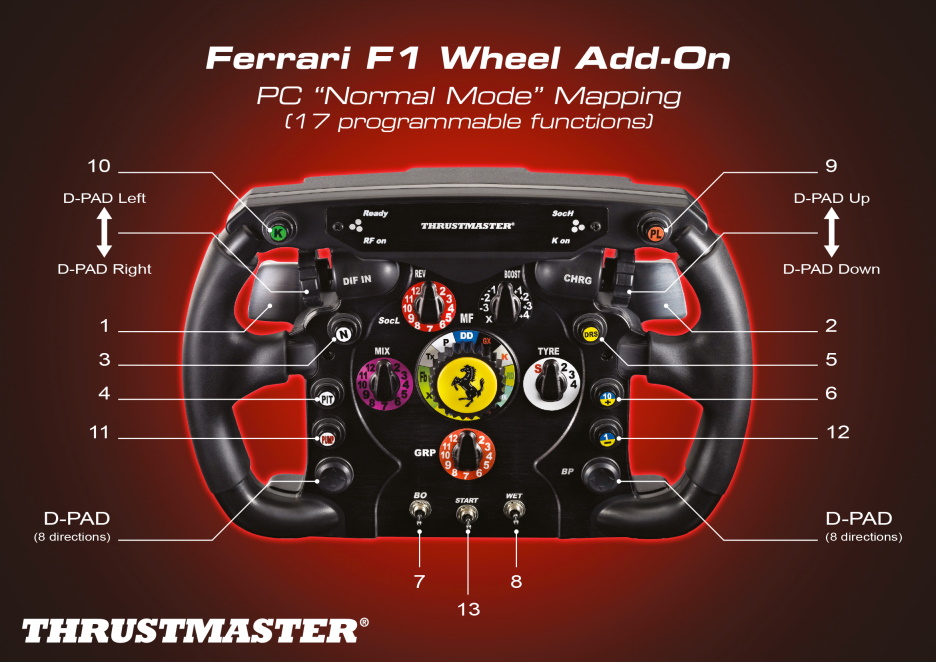
FERRARI F1 WHEEL - “PC” GENERIC MAPPING
PC
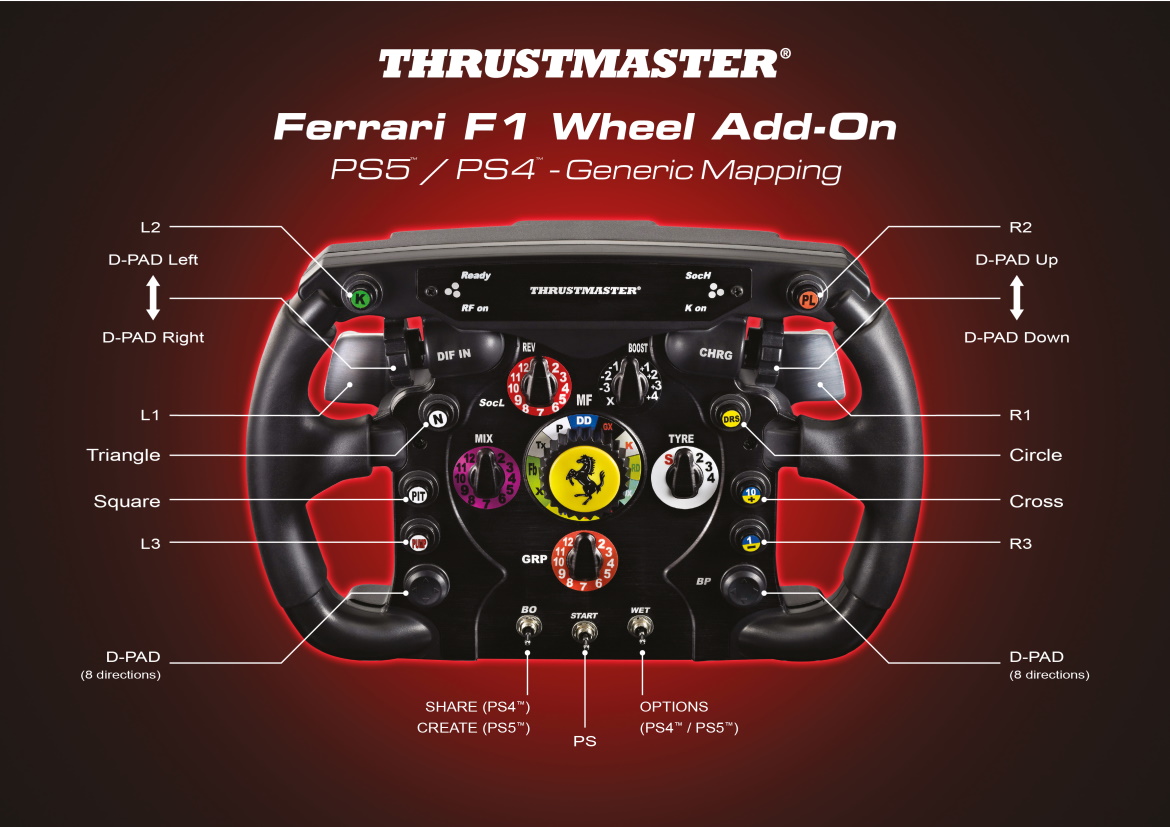
FERRARI F1 WHEEL - PlayStation® GENERIC MAPPING
PS4™ PlayStation®5
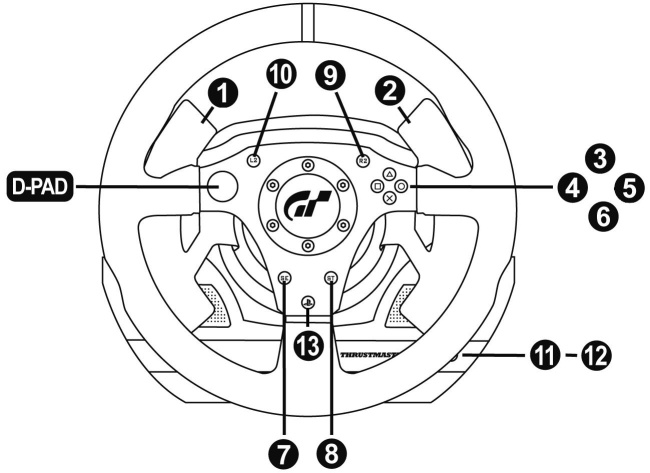
GT WHEEL - “PC” GENERIC MAPPING
PC
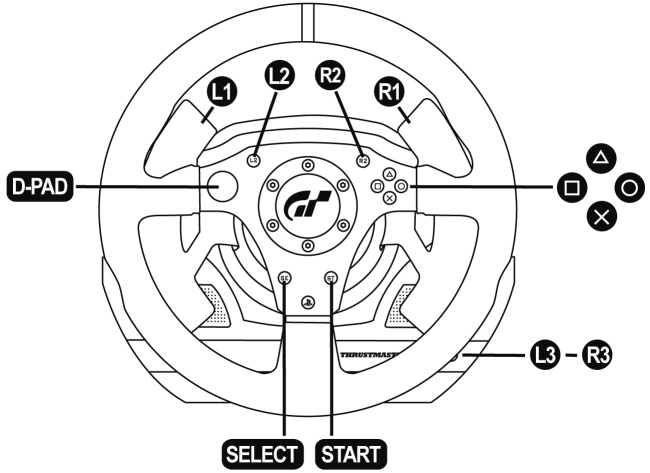
GT WHEEL - PlayStation® GENERIC MAPPING
PS3™ PS4™
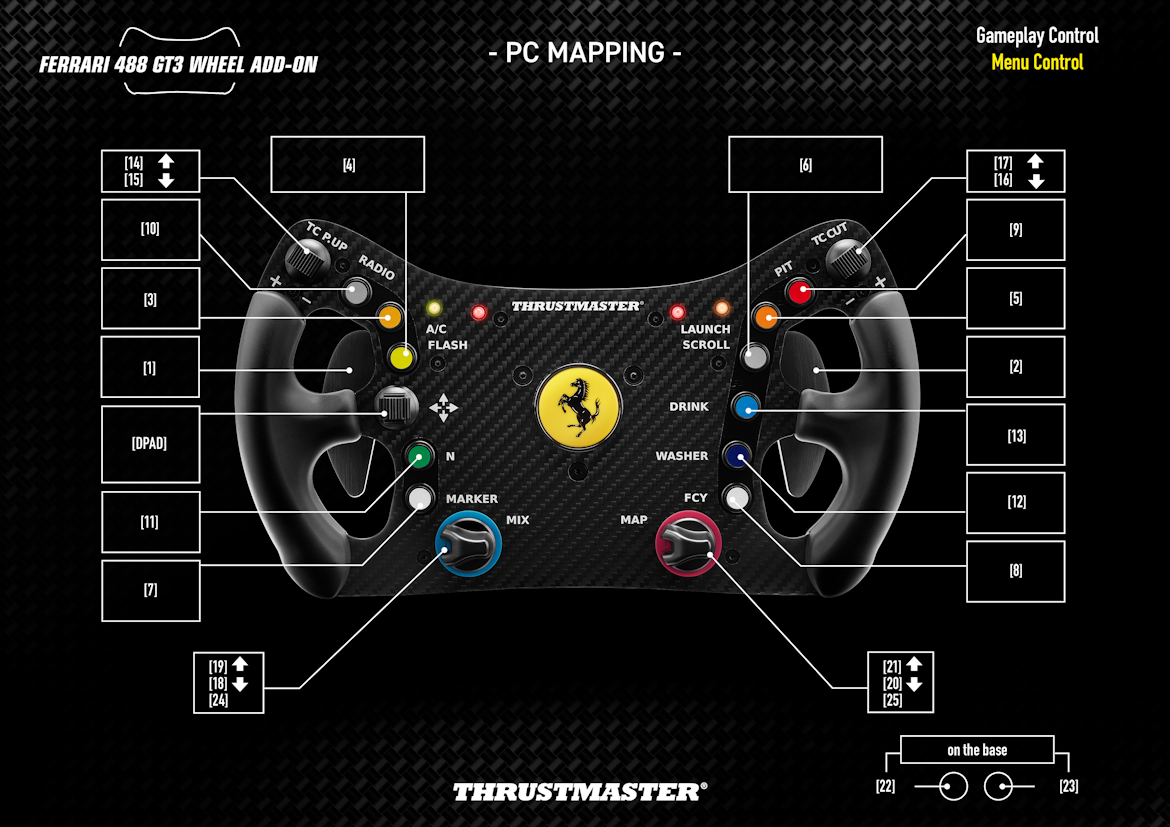
PC - GENERIC MAPPING – Ferrari 488 GT3 Wheel Add-on
PC
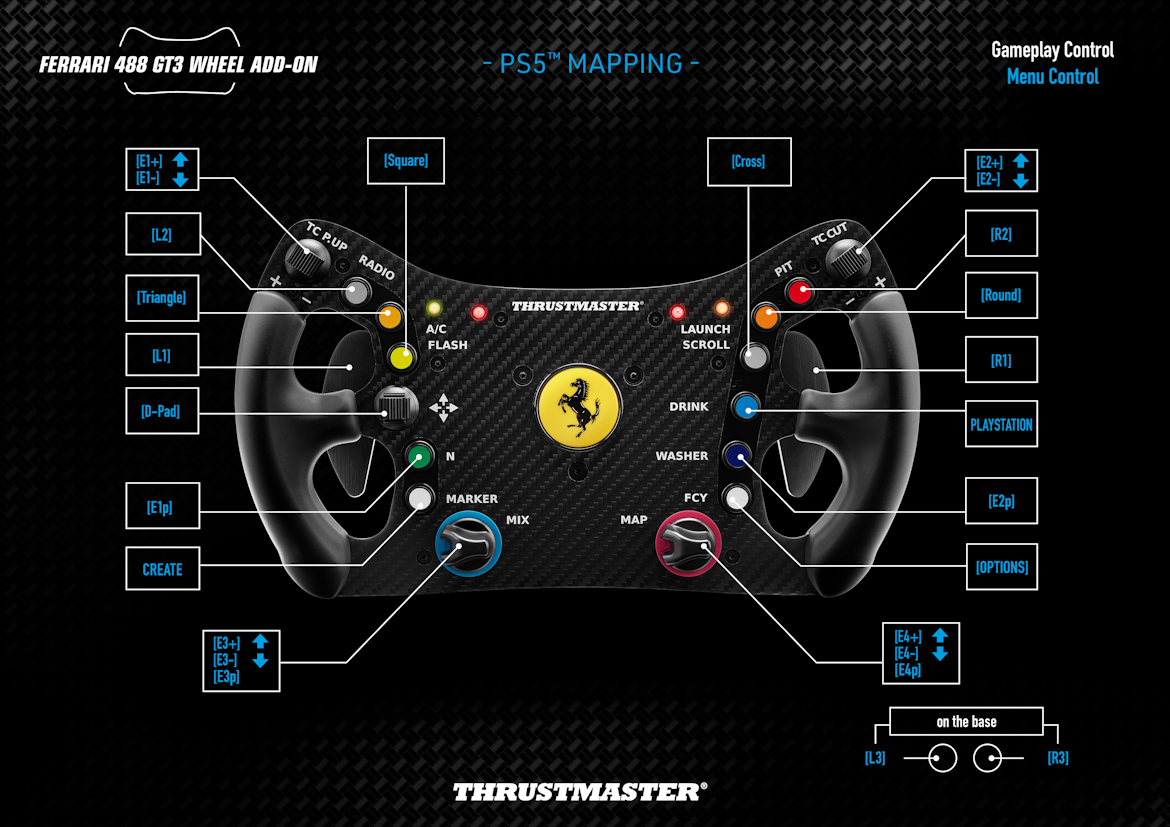
PS4™ / PS5™ - GENERIC MAPPING – Ferrari 488 GT3 Wheel Add-on
PS4™ PlayStation®5
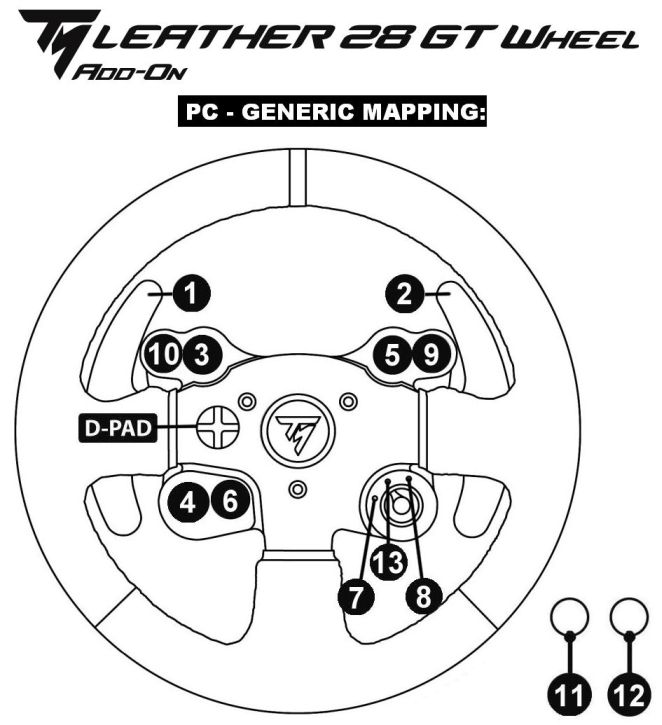
TM LEATHER 28 GT WHEEL - “PC” GENERIC MAPPING
PC
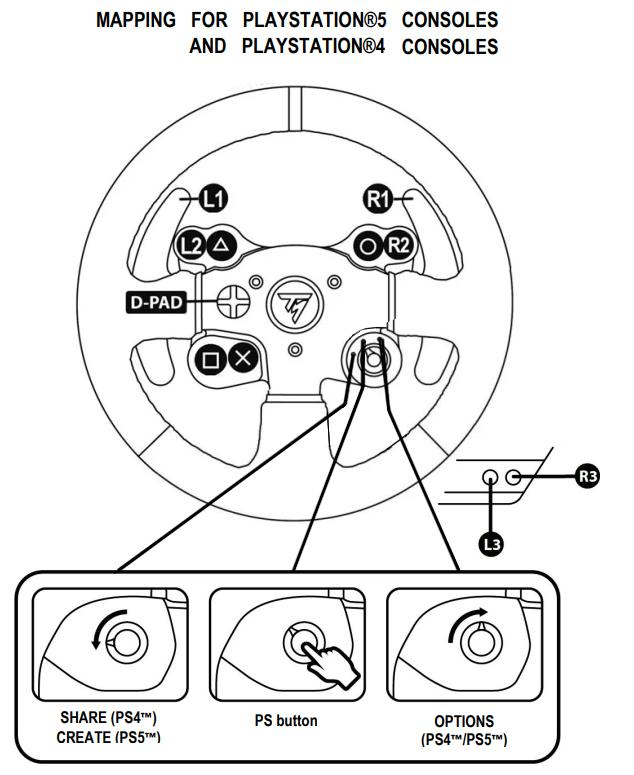
TM LEATHER 28 GT WHEEL - PlayStation® GENERIC MAPPING
PS4™ PlayStation®5
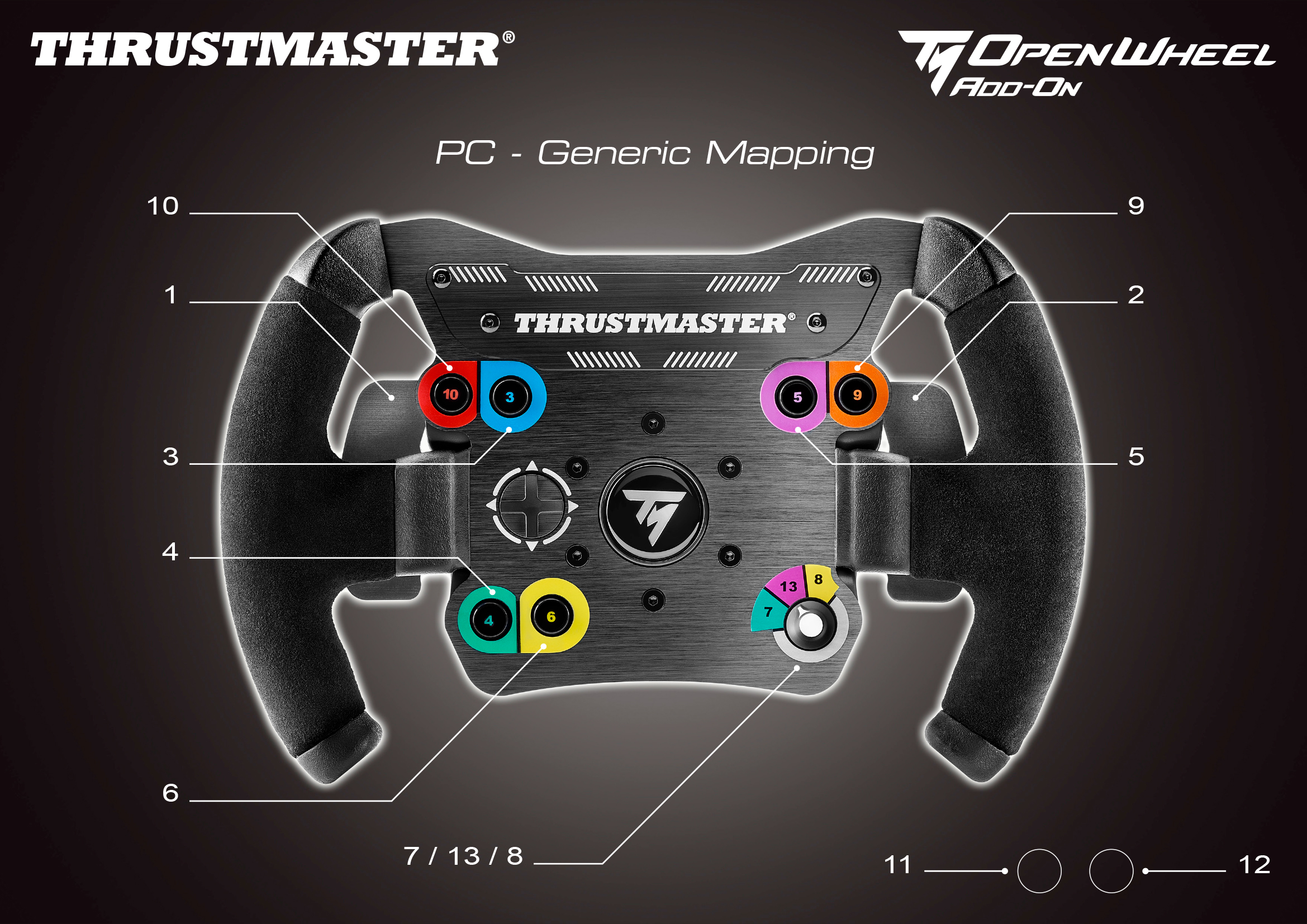
TM Open Wheel - PC GENERIC MAPPING
PC PS4™ Xbox One™

TM Open Wheel - PS5-PS4 GENERIC MAPPING
PC PS4™ PlayStation®5 Xbox One™
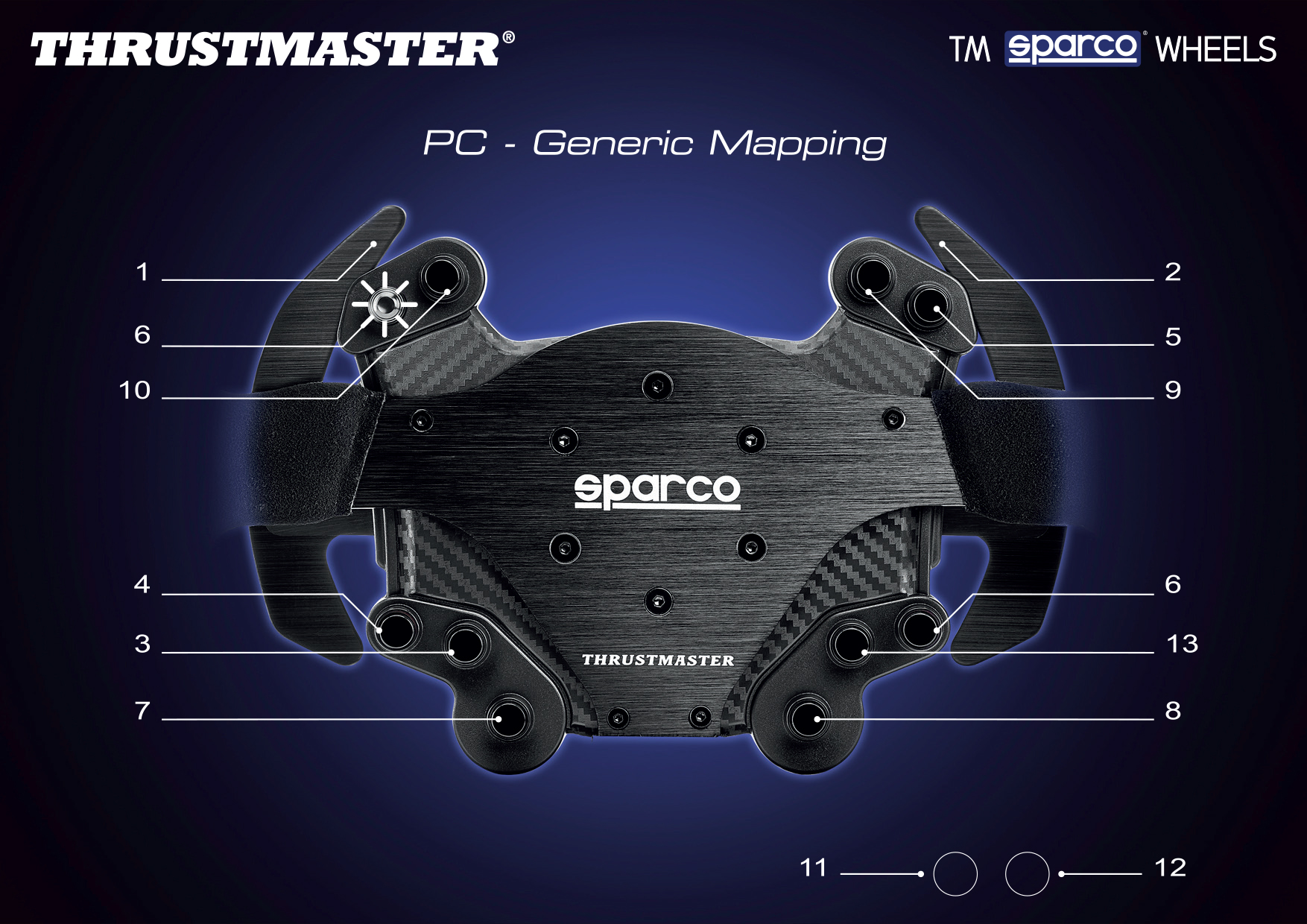
TM Sparco® Wheels - “PC” GENERIC MAPPING
PC PS4™ Xbox One™
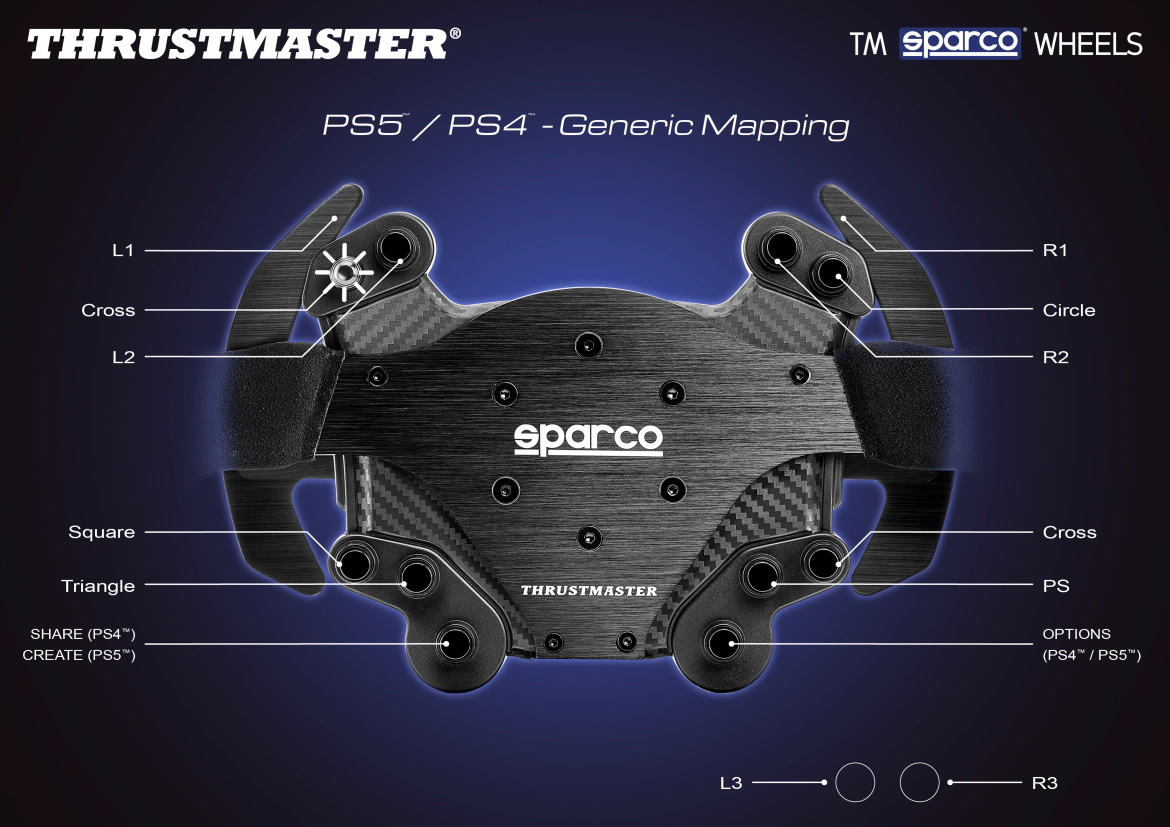
TM Sparco® Wheels - PS5-PS4 GENERIC MAPPING
PC PS4™ PlayStation®5 Xbox One™
게임 설정
- T300 - PlayStation®3 Games list / Liste des jeux / Liste der spielePS3™
- T300 - PlayStation®4 Games list / Liste des jeux / Liste der spielePS4™
- T300 - PlayStation®5 Games list / Liste des jeux / Liste der spielePlayStation®5
-
Mapping – GRAN TURISMO® 7 (PS4 & PS5) – T300PS4™ PlayStation®5
-
Mapping – LE MANS® ULTIMATE (PC) – Ferrari 488 GT3 Wheel Add-On PC
-
Mapping – LE MANS® ULTIMATE (PC) – Ferrari F1 Wheel Add-OnPC
-
Mapping – LE MANS® ULTIMATE (PC) – Formula Wheel Add-On PC
-
Mapping – LE MANS® ULTIMATE (PC) – T300 - GT WheelPC
-
Mapping – LE MANS® ULTIMATE (PC) – TM LEATHER Wheel Add-On PC
-
Mapping – LE MANS® ULTIMATE (PC) – TM OPEN Wheel Add-On PC
-
Mapping – LE MANS® ULTIMATE (PC) – TM Sparco® Wheels Add-On PC
-
Mapping – PROJECT CARS 3 - T300 RSPS4™
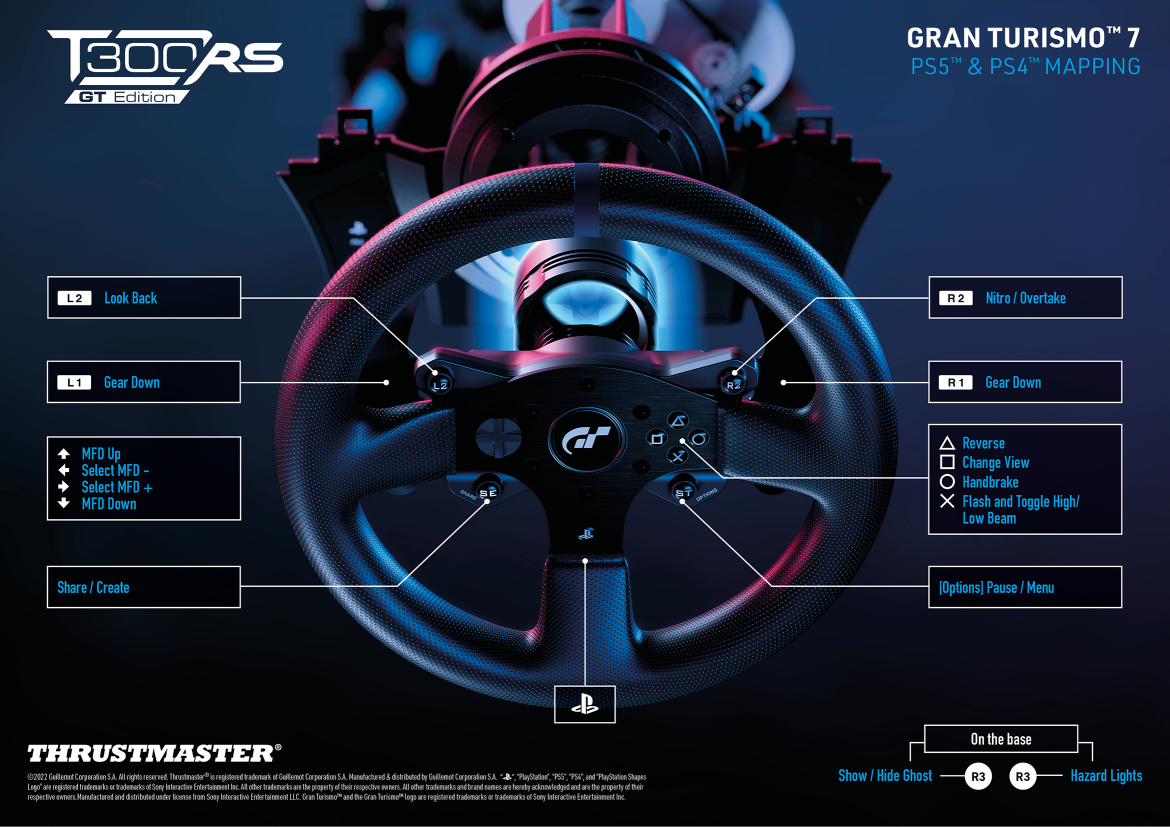
Mapping – GRAN TURISMO® 7 (PS4 & PS5) – T300
PS4™ PlayStation®5
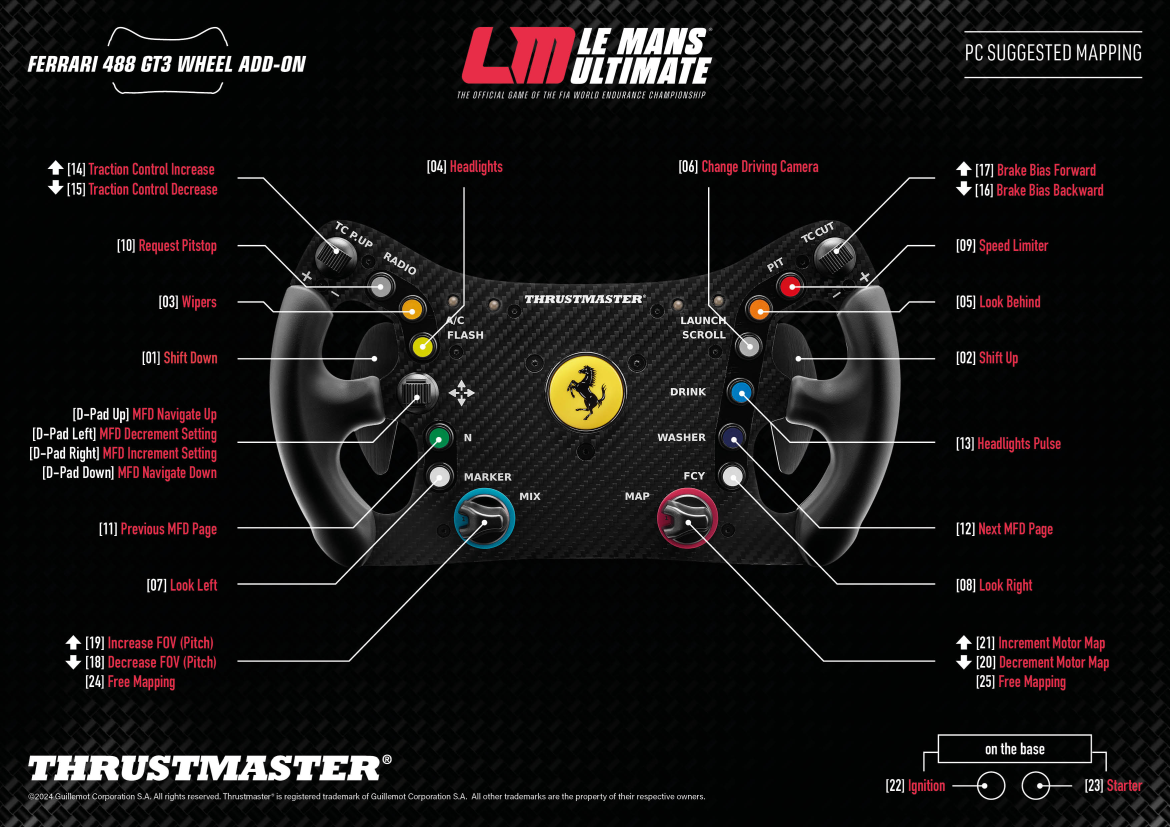
Mapping – LE MANS® ULTIMATE (PC) – Ferrari 488 GT3 Wheel Add-On
PC
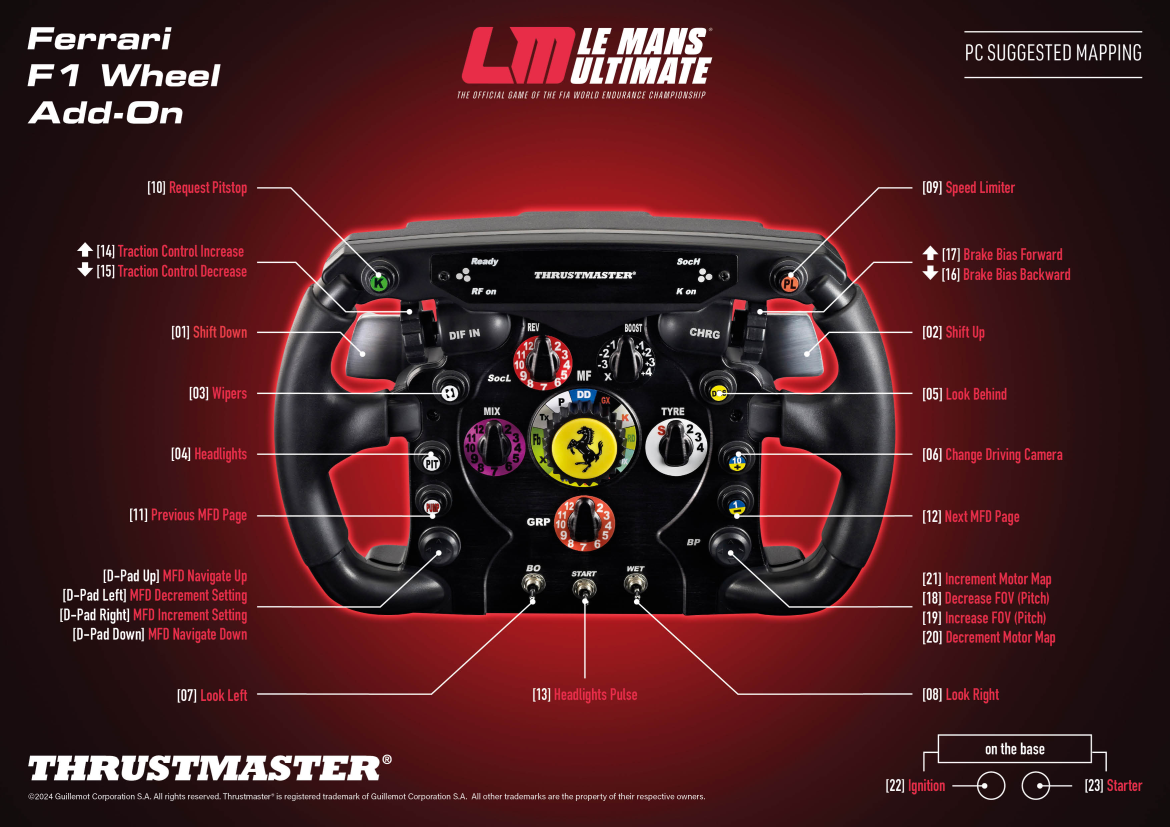
Mapping – LE MANS® ULTIMATE (PC) – Ferrari F1 Wheel Add-On
PC
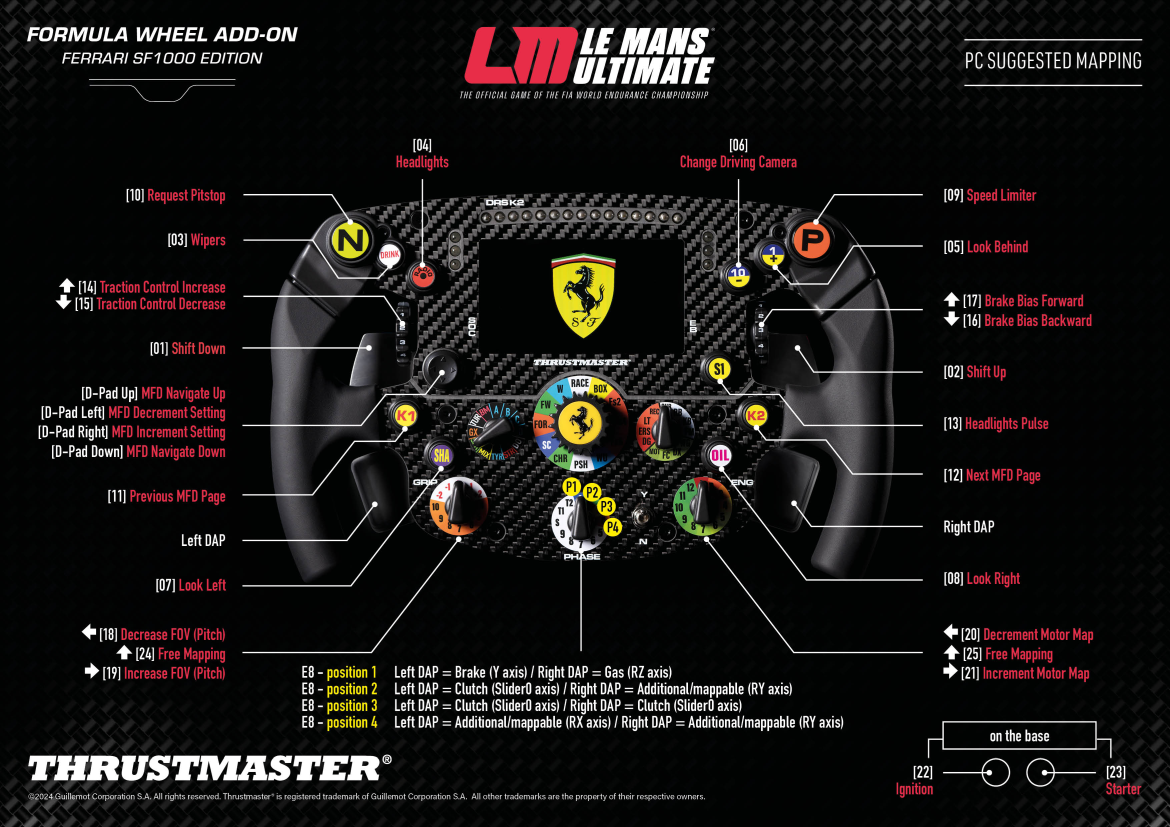
Mapping – LE MANS® ULTIMATE (PC) – Formula Wheel Add-On
PC
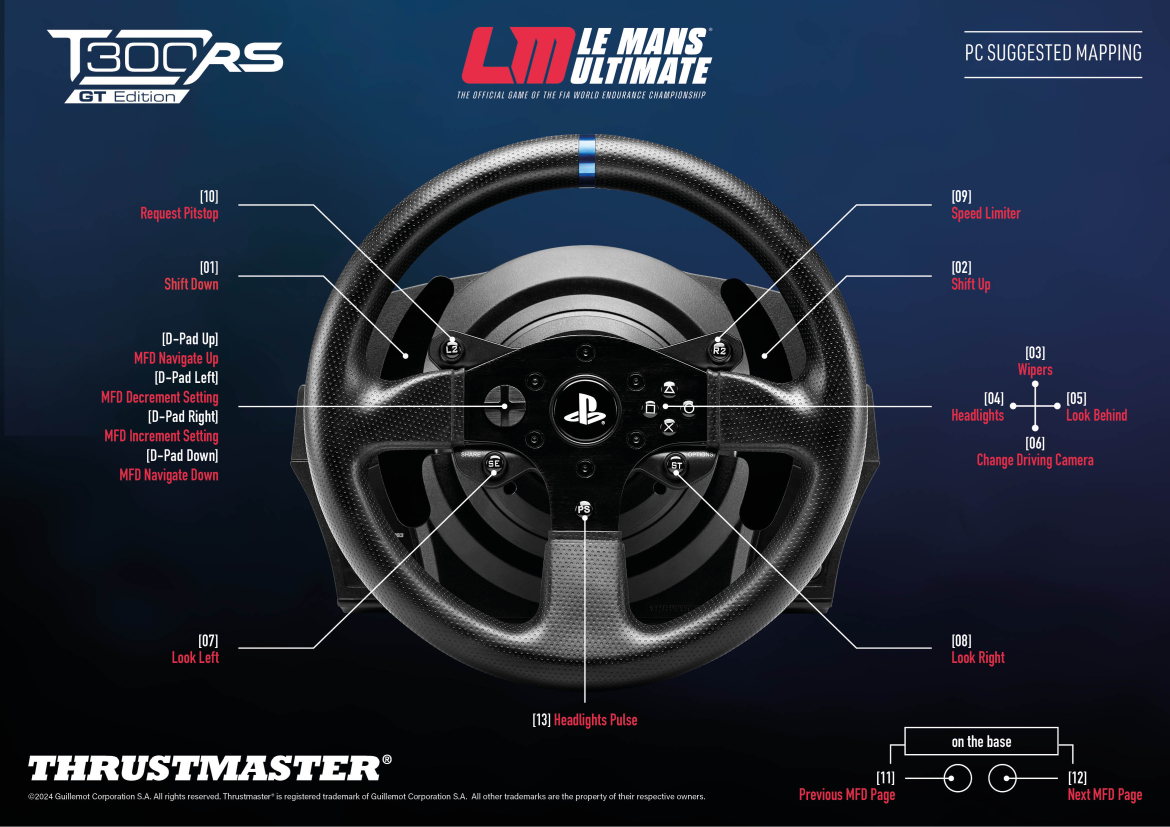
Mapping – LE MANS® ULTIMATE (PC) – T300 - GT Wheel
PC
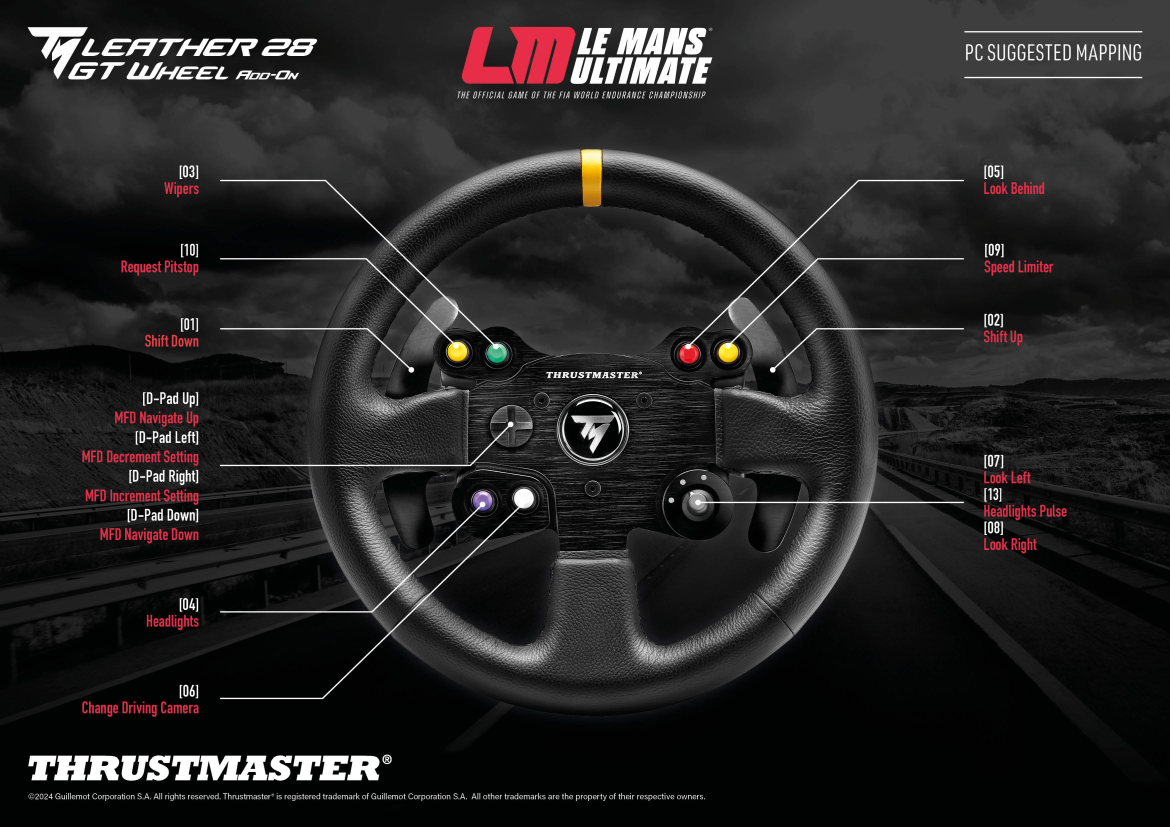
Mapping – LE MANS® ULTIMATE (PC) – TM LEATHER Wheel Add-On
PC
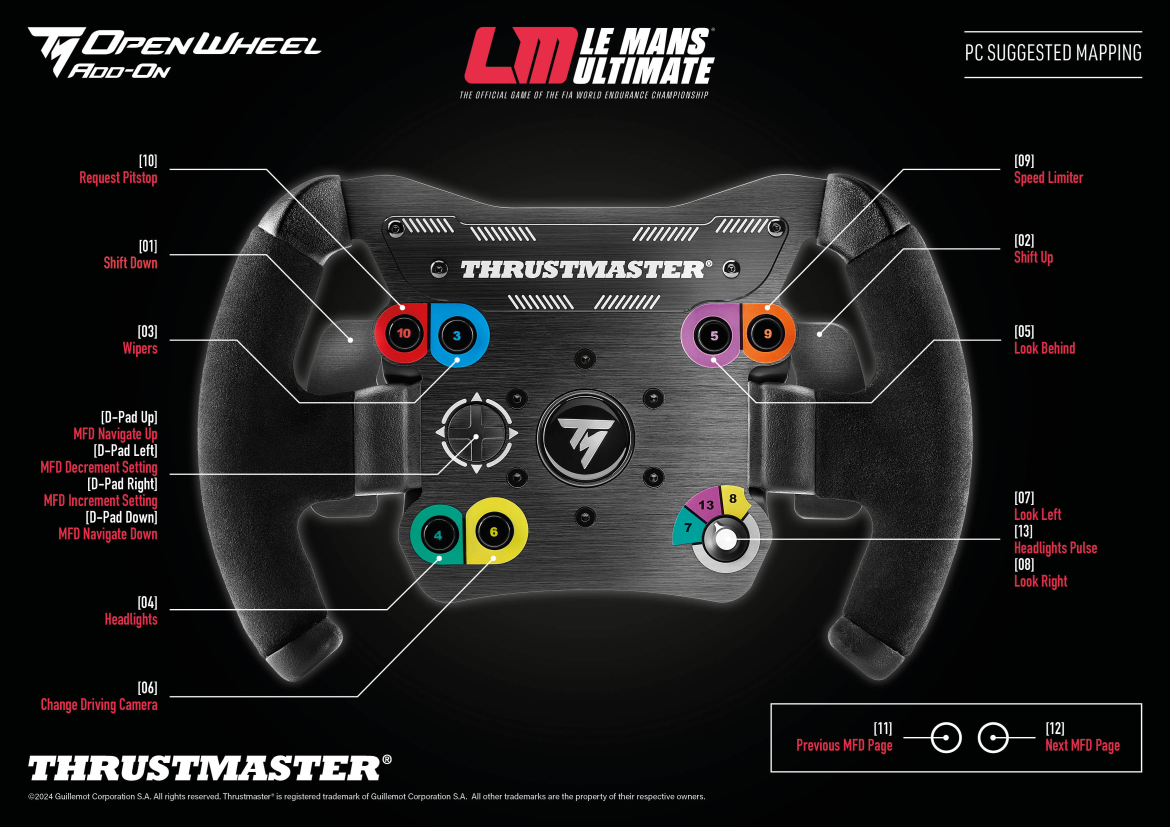
Mapping – LE MANS® ULTIMATE (PC) – TM OPEN Wheel Add-On
PC
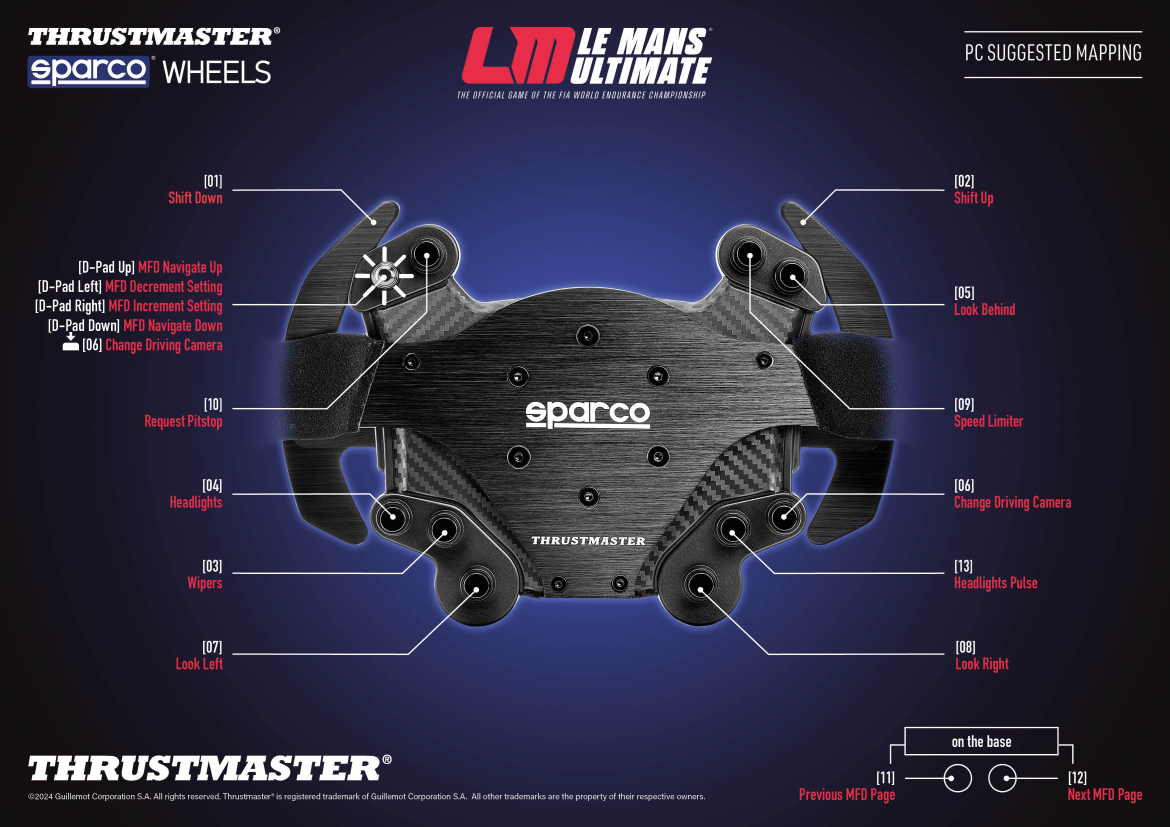
Mapping – LE MANS® ULTIMATE (PC) – TM Sparco® Wheels Add-On
PC

Mapping – PROJECT CARS 3 - T300 RS
PS4™
More games settings available in english
- WHEELS - Compatibility with CLOUD GAMING and STREAMING
기술 자료
 게임을 할 때 레이싱 휠의 포스 피드백이 약해지거나 사라지거나 끊어집니다. 레이싱 휠이 저절로 열을 받거나 전원이 꺼지는 경우도 있습니다. 어떻게 해야 될까요?
- 내 Thrustmaster 레이싱 휠은 일반적인 이름이나 표준 휠의 모양으로 인식됩니다
- 도움말 센터 – 페달 세트
- 레이싱 휠 베이스의 펌웨어 확인
- 레이싱 휠: 플랫폼, 장치 및 애드온과의 호환성
- Thrustmaster 레이싱 휠의 보정 및 포스 피드백 테스트
- 도움말 센터 - T300
- 펌웨어 업데이트 - Thrustmaster 포스 피드백 레이싱 휠
- 절전 모드 해제 방법(부트로더) - Thrustmaster 포스 피드백 레이싱 휠
- 도움말 센터 – 레이싱 휠: Thrustmaster 레이싱 휠(레이싱 휠 베이스, 휠 애드온, 애플리케이션, 드라이버)은 어떻게 업데이트하나요?
FAQ
영어로 FAQ 더 보기
Checking and, if necessary, reconfiguring the racing wheel’s center value - T300how can i verify the T300 RS / T300 Ferrari GTE is correctly installed on my computer?I have calibrated my device in the Windows control panel, but my device’s axes are not progressive - How to reset the Windows calibration (Racing Wheels)instructions on how to manually change the wheel’s angle of rotation on playstation®3/playstation®4 in force feedback games.New:Important note about the new firmware (now handles & detects differently the type of pedal set connected via RJ12)Note regarding cooling fan operation and motor cooling on T300on pc, the usb selector switch on the t300 rs racing wheel’s base must always be set to the ’PS3’ position!Tip for using PS4 steering wheels in ASSETTO CORSA COMPETIZIONE – PS4 (V: 1.3.7) two important remarks to avoid some force feedback or calibration issues in playstation®4 games라이선스
Immersion® - Incorporates sofware licensed from Immersion Corporation.
Produced under license of Ferrari Brand S.p.A. The name FERRARI, the PRANCING HORSE device, all associated logos and distinctive designs are property of Ferrari S.p.A. The body designs of the Ferrari cars are protected as Ferrari S.p.A. property under design, trademark and trade dress regulations.