 Français
 English
 Deutsch
 Español
 Italiano
 Nederlands
 Português
 Русский
 中文 (中国)
 한국어
 日本語
 Svenska
 Türkçe

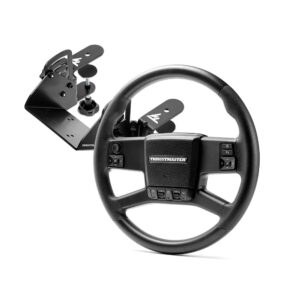
SIMTASK TRUCK-40 ADD-ON KIT
Numéro de produit 4060357
Attention
Information regarding ’’Plug & Play’’ mapping for Euro Truck Simulator 2 and American Truck Simulator
Please be aware that the automatic "Plug & Play" profile for the SimTask Truck-40 Add-On Kit is not yet active by default in Euro Truck Simulator 2 and American Truck Simulator. Our teams have been working closely with developer SCS Software to roll out automatic control assignment, which will be included in an upcoming game update.
In the meantime, while awaiting the game update that includes this feature by default, you can ensure your wheel works seamlessly by applying the official Euro Truck Simulator 2 / American Truck Simulator profile created by SCS Software.
This file is available to download from our support website under the ’’Farming / Trucking’’ section, alongside instructions on how to add it to your game files.
Alternatively, if you prefer to assign the controls manually, the detailed ’’Plug & Play’’ mapping is also available in the same section. As a reminder, please ensure your wheel base firmware is fully updated as well.
Thank you for your patience and understanding.
# SIMTASK TRUCK-40 Installation Instructions
# SIMTASK TRUCK-40 Installation Instructions-Mapping
Note:
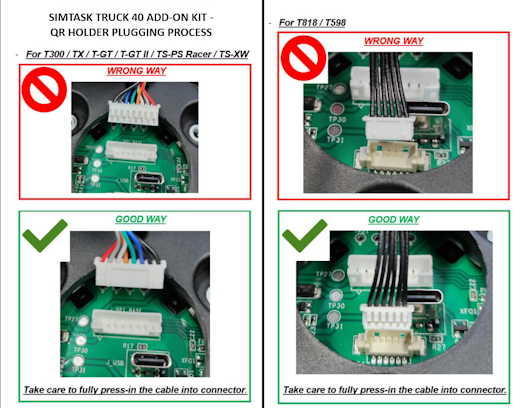
- Il est impératif de mettre à jour le firmware de votre base [T300 / TX / T-GT / T-GT II / TS-XW / TS-PC / T598 / T818]
- Le firmware de la roue Simtask Truck-40 WHEEL ADD-ON est déjà à jour (pas de mise à jour nécessaire)
Manuel utilisateur
Mappage des boutons
 Simtask Truck-40 Add-On Kit - Button MappingPC PlayStation®5 Xbox Series X|S™
-
 PC - GENERIC MAPPING – Simtask Truck-40 Add-On Kit PC
-
PS5™ - GENERIC MAPPING – Simtask Truck-40 Add-On Kit
-
Xbox One™ / Xbox Series X|S™ - GENERIC MAPPING – Simtask Truck-40 Add-On Kit Xbox Series X|S™
PC - GENERIC MAPPING – Simtask Truck-40 Add-On Kit
PC
PS5™ - GENERIC MAPPING – Simtask Truck-40 Add-On Kit
Xbox One™ / Xbox Series X|S™ - GENERIC MAPPING – Simtask Truck-40 Add-On Kit
Xbox Series X|S™
Paramètres de jeux
 Instruction + Mapping File - American Truck Simulator/Euro Truck Simulator 2 - Simtask Truck-40 Add-On KitPC
-
Mapping – American Truck Simulator (PC / PS5™/ Xbox) – Simtask Truck-40 Add-On Kit PC PlayStation®5 Xbox Series X|S™
-
Mapping – Euro Truck Simulator EN (PC / PS5™/ Xbox) – Simtask Truck-40 Add-On Kit PC PlayStation®5 Xbox Series X|S™
-
Mapping – Euro Truck Simulator FR (PC / PS5™/ Xbox) – Simtask Truck-40 Add-On Kit PC PlayStation®5 Xbox Series X|S™
Mapping – American Truck Simulator (PC / PS5™/ Xbox) – Simtask Truck-40 Add-On Kit
PC PlayStation®5 Xbox Series X|S™
Mapping – Euro Truck Simulator EN (PC / PS5™/ Xbox) – Simtask Truck-40 Add-On Kit
PC PlayStation®5 Xbox Series X|S™
Mapping – Euro Truck Simulator FR (PC / PS5™/ Xbox) – Simtask Truck-40 Add-On Kit
PC PlayStation®5 Xbox Series X|S™
Base de connaissances


Tutoriels
