 English
  Français
 Deutsch
 Español
 Italiano
 Nederlands
 Português
 Русский
 中文 (中国)
 한국어
한국어 日本語
日本語 Svenska
Product: T.Flight Hotas 4
Platforms:
- PC with Windows 10/11 or later.
- macOS 10.15 or later (Mac compatibility applies only when using the T.Flight Hotas 4 with GeForce NOW).
This article shows you how to switch the T.Flight Hotas 4 to HID mode to play in streaming / cloud gaming on the GeForce NOW service. This procedure does not require any driver.
Important: HID mode on the T.Flight Hotas 4 must be activated manually each time you start a new gaming session on GeForce NOW.
1. To begin, the T.Flight Hotas 4 must be unplugged.
2. Press and hold the “Share” and “Options” buttons.
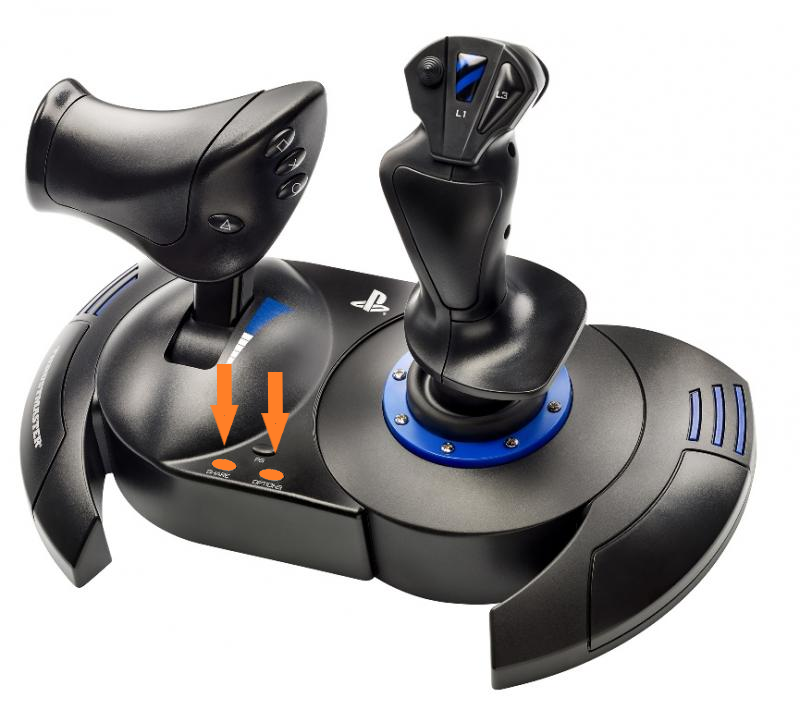
3. Connect the T.Flight Hotas 4 to a USB port on your PC or Mac.
4. Wait a few seconds, then release the “Share” and “Options” buttons.
T.Flight Hotas 4 is now in HID mode. You can start your session on GeForce NOW.
For more information on using Thrustmaster joysticks with GeForce NOW, you can refer to our article: Thrustmaster Compatibility with GeForce NOW for Streaming / Cloud Gaming (PC, Mac)