 한국어
한국어  Français
 English
 Deutsch
 Español
 Italiano
 Nederlands
 Português
 Русский
 中文 (中国)
 日本語
日本語 Svenska
 Türkçe
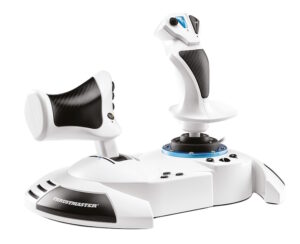
T.Flight Hotas One Microsoft Flight Simulator Edition
제품 번호 4460295
매뉴얼
드라이버
 Drivers - Package 2026_TFHT_3 + Firmware [System Requirement: Windows® 10 / 11]PC
 릴리즈 노트 - Drivers - Package 2026_TFHT_3 + Firmware [System Requirement: Windows® 10 / 11]
Drivers - Package 2026_TFHT_3 + Firmware [System Requirement: Windows® 10 / 11]
This driver package is compatible with Joysticks:
- Airbus Add-On Grip- AVA Advanced Versatile Aviation- Hotas Warthog MKII- Simtask Farmstick (PC)- SimTask FarmStick (Xbox Series/PC)- SimTask FarmStick (PS5/PC)- SOL-R Flightstick- SOL-6 Throttle- T.16000M- T.16000M FCS- T.Flight Hotas 4- T.FLIGHT HOTAS 5 MSFS SPECIAL EDITION- T.Flight Hotas One *- T.Flight Hotas One - Microsoft Flight Simultor Edition*- T.FLIGHT HOTAS Neo (PS5/PC)- T.FLIGHT HOTAS Neo X (Xbox Series/PC)- TCA Sidestick Airbus Edition*- TCA Quadrant Airbus Edition- TCA Yoke Boeing Edition*- TCA Quadrant Boeing Edition- TCA Sidestick X Airbus Edition- TCA Sky Yoke (Xbox Series/PC)- TCA Sky Yoke (PS5/PC)- TWCS Throttle- Viper TQS- Viper Panel
* On PC, the USB sliding switch on the base must always be set to the PC position!
System Requirement:
- Windows® 11 & 10
**Changes made in new package version 2026_TFHT_3
- Add support for Hotas Warthog MKII- Add support for T.Flight Hotas NEO (Xbox Series/PC)- Add support for T.Flight Hotas NEO (PS5/PC)- Add support for TCA Sky Yoke (Xbox Series/PC)- Add support for TCA Sky Yoke (PS5/PC)
**Changes made in previous package version 2026_TFHT_2
- Add FW Boeing Yoke v1.56_BETA (Double command)
Changes made in previous package version 2026_TFHT_1
- Add support for T.FLIGHT HOTAS 5 MSFS SPECIAL EDITION- Add support for Airbus Add-On Grip
Changes made in previous package version 2025_TFHT_5
- Add support for SOL-R 6 Throttle- Added Firmware V1.34 for SOL-R Flightstick
Changes made in previous package version 2025_TFHT_4
- Add support for SimTask FarmStick (PS5/PC)- Added Firmware V1.14/ H V1.11 for SimTask FarmStick (PC)
Changes made in previous package version 2025_TFHT_3
- Add support for SOL-R Flightstick- Added Firmware V1.35/ H V2.03 for SimTask FarmStick (Xbox One/Xbox Series/PC)- Added Firmware v2.07 for AVA Advanced Versatile Aviation- Added dedicated control panel for AVA Advanced Versatile Aviation
Changes made in previous package version 2025_TFHT_2
- Added support for SimTask FarmStick (Xbox One/Xbox Series/PC)- Added Firmware V1.14/ H V1.10 for SimTask FarmStick (PC)
Changes made in previous package version 2025_TFHT_1
- Added support for T.Flight Hotas One - Microsoft Flight Simultor Edition
Changes made in previous package version 2024_TFHT_1
- Added support for AVA Advanced Versatile Aviation
Changes made in previous version 2023_TFHT_2:
- Added support for Simtask Farmstick- Added Firmware v1.26 for Viper TQS- TCA Quadrant Boeing: corrected a Control panel graphical glitch.
Changes made in previous version 2023_TFHT_1:
- Added support for Viper TQS- Added support for Viper Panel
Changes made in previous version 2022_TFHT_1:
- Added support for TCA Sidestick X Airbus Edition
Changes made in previous version 2021_TFHT_2:
- Added support for TCA Yoke Boeing Edition- Added support for TCA Quadrant Boeing Edition- Added Firmware V1.50 for Yoke Boeing Edition
Changes made in new previous version 2021_TFHT_1:
- Added Firmware V1.69 for TCA Quadrant Airbus Edition
Changes made in previous version 2020_TFHT_5:
- Added Firmware V1.61 for TCA Quadrant Airbus Edition
Changes made in previous version 2020_TFHT_5:
- Added Firmware V1.60 for TCA Quadrant Airbus Edition
Changes made in previous version 2020_TFHT_3:
- Improved CPL for TCA Sidestick Airbus Edition (Added Throttle mode selector)- Added Firmware V1.11 for TCA Sidestick Airbus Edition- Added Firmware V1.56 for TCA Quadrant Airbus Edition
Changes made in version 2020_TFHT_2:
- Improved CPL for TCA Sidestick Airbus Edition (ajout du selecteur de mode throttle)- Added Firmware V1.11 for TCA Sidestick Airbus Edition
Changes made in version 2020_TFHT_1:
- Added Support for TCA Sidestick Airbus Edition and TCA Quadrant Airbus Edition- Added Firmware V1.08 for TCA Sidestick Airbus Edition- Added Firmware V1.17 for TCA Quadrant Airbus Edition
Changes made in version 2019_TFHT_1:
- Added new firmware V1.17 for the T.Flight Hotas One joystick (V1.17 fixes an issue of axes freeze found on the joystick after Xbox One startup when the console was configured in Energy-saving / Full Shutdown mode).
Changes made in driver version 2018_TFHT_1:
- Added new firmware V25 for the T.Flight Hotas 4 Joystick (V25 brings a new Tip/Feature on PS4™ to program & combine the T.Flight Rudder Pedals with the T.Flight Hotas 4)
Your joystick’s Firmware version appears in the bottom right in the Control Panel’s tabs:
- T.Flight Hotas 4: V25- T.Flight Hotas 5: V1.09- T.Flight Hotas One: V1.17- T.Flight Hotas One - MSFS edition: V2.04- T.FLIGHT HOTAS Neo: v1_22_v108- T.FLIGHT HOTAS Neo X: v1_25_v108- TWCS Throttle: V8- TCA Sidestick Airbus Edition: V1.11- TCA Quadrant Airbus Edition: V1.69- TCA Yoke Boeing Edition: V1.50- TCA Quadrant Boeing Edition: V1.28- TCA Sidestick X Airbus Edition: V1.27- Viper TQS: V1.26/1.15- Viper Panel: V1.18- Simtask Farmstick (PC): V1.14/ H V1.11- SimTask FarmStick (Xbox One/Xbox Series/PC): V1.35/ H V2.03- SimTask FarmStick (PS5/PC): V1.24/ H V2.03- AVA Base: V1.14 / V2.07- SOL-R Flightstick: V1.34/ H V1.33- SOL-R Throttle: V1.04- Airbus Add-On Grip: V1.16
Important:
- DO NOT CONNECT the device to your PC before being prompted to do so.- DO NOT CLICK in any Windows-specific panes that may appear during the update process.- RESTART THE COMPUTER once the package setup is complete.
Create a folder for all your Thrustmaster downloads: right-click the Windows desktop, then point to New/Folder.
- Name the folder Thrustmaster Downloads.- Click the download link.- A File Download dialog box appears. Click Save.- A Save As dialog box appears. Select the Thrustmaster Downloads folder you have created and then click Save.
Installation:
**NOTE**: If a driver package for your product is already installed on the computer, running the package installation once will actually uninstall the previous version. It will then be necessary to run it again to proceed to the installation of the new version.
1- Double-click the installation file (2026_TFHT_3.exe) to proceed with the installation.
2- Follow the instructions displayed onscreen.
3- When done, select
- Start/All Apps/Thrustmaster/Control Panel.
The Game controllers dialog box is displayed.
The Throttle appears under the name TWCS Throttle, with the status OK.
The Joystick appears onscreen with the name T.FLIGHT HOTAS 4 and status indication OK
The Joystick appears onscreen with the name T.FLIGHT HOTAS One and status indication OK
4- In the Game Controllers dialog box, select Properties to test and view all functions.
a) TWCS throttle
Note: The Enable Center Deadzone tab allows you to activate or deactivate the mini-stick’s axes center dead zone. Your selection is automatically saved to the TWCS’s internal memory.
b) T.Flight Hotas 4
- “4/6 Axis Mode” (PS indicator light is Red) : On PC axes Rocker (Slider 0), Twist (RZ) & Rudder (Slider 1) are all combined on a single axis (RZ)- “5/8 Axis Mode” (PS indicator light is Green): On PC all axes are separated and independents.
c) T.Flight Hotas One/ T.Flight Hotas One - MSFS edition
- “4/6 Axis Mode” (Xbox buttons indicator light is On): On PC axes Rocker (Slider 0), Twist (RZ) & Rudder (Slider 1) are all combined on a single axis (RZ)- “5/8 Axis Mode” (Xbox buttons indicator light is Off): On PC all axes are separated and independents.
Click on OK to save your settings and exit the Control Panel.
d) TCA Quadrant Airbus Edition
“Enable Virtual Buttons” allows you to activate or deactivate the virtual buttons for the Throttle and Air Brake axes (with Add on installed).
Click on APPLY to save your settings and exit the Control Panel.
You are now ready to play!
소프트웨어

게임 설정
 How to correct inverted axes on Microsoft Flight Simulator 2024Xbox Series X|S™
- HOW TO CORRECT TFRP MAPPING ON MICROSOFT FLIGHT SIMULATOR 2024?PC
- HOW TO CREATE A MAPPING CONTROL FOR THRUSTMASTER FLIGHT CONTROL DEVICES ON MICROSOFT FLIGHT SIMULATOR 2024PC
- T.Flight Hotas One - Xbox One™ Games list / Liste des jeux / Liste der spieleXbox One™
- T.Flight Hotas One - Xbox Series X|S Games list / Liste des jeux / Liste der spiele Xbox Series X|S™
-
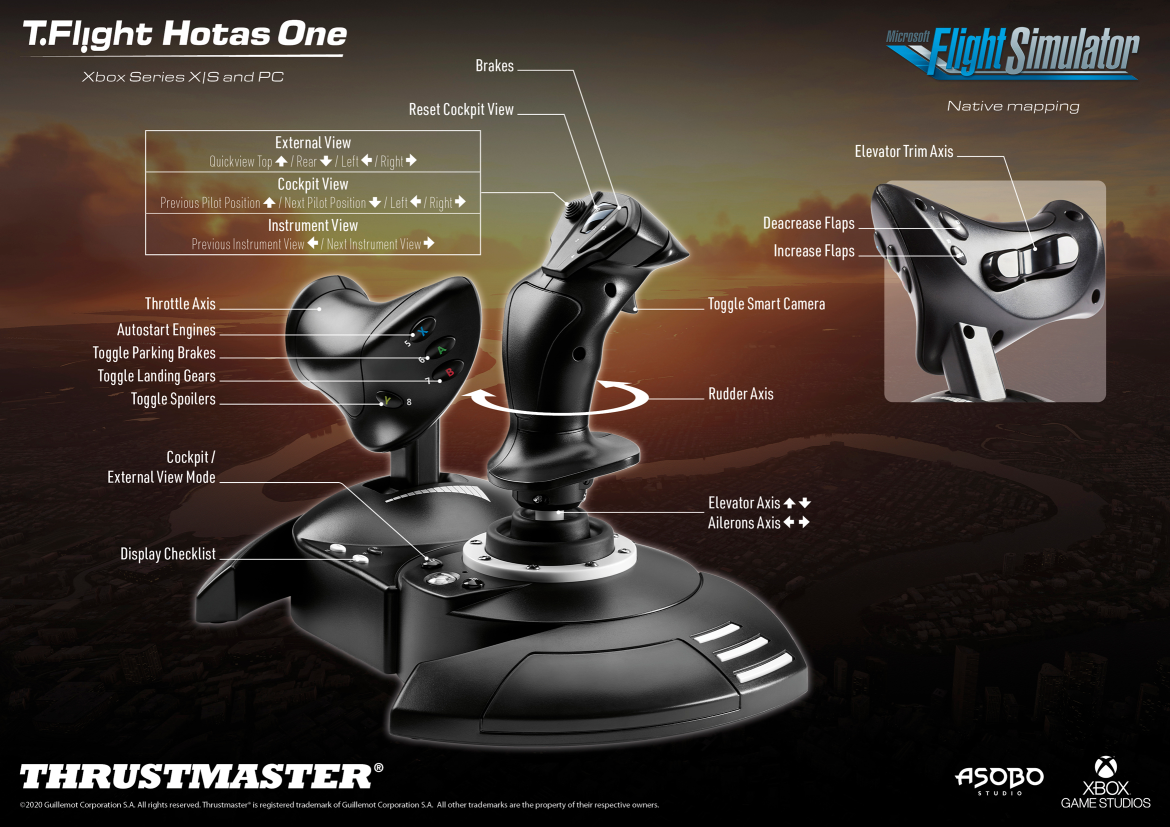
 Mapping - Microsoft Flight Simulator - PC & Xbox Series X|S - T.Flight Hotas One - Native Mapping PC Xbox Series X|S™
T.Flight Hotas One - Xbox One™ Games list / Liste des jeux / Liste der spiele
EN - On Xbox One™, the T.Flight Hotas One is compatible with the following games :
FR - Sur Xbox One™ le joystick T.Flight Hotas One est compatible avec les jeux suivants :
DE - Auf der Xbox One™ ist der T.Flight Hotas One Joystick mit den folgenden Spielen kompatibel :
- Ace Combat 6™: Fires of Liberation – Xbox 360 backward compatibility (*)- Ace Combat 7™ : Skies Unknown – Xbox One™ (*)- AIR MISSIONS: HIND – Xbox One™ (*)- ELITE DANGEROUS – Xbox One™ (*)- FLYING TIGERS: Shadows Over China (*)- THE CREW™ 2 – Xbox One™(*)- STAR WARS™: Squadrons – Xbox One™ (*)- WAR THUNDER – Xbox One™ (*)
EN (*) In this game, the TFRP (T.Flight Rudder Pedals) rudder system, which is sold separately, is also compatible when connected to the joystick’s connector.
FR (*) Dans ce jeu le palonnier TFRP (T.Flight Rudder Pedals), qui est vendu séparément, est également compatible lorsqu’il est relié au connecteur du joystick.
DE (*) In diesem Spiel ist das TFRP (T.Flight Rudder Pedals)-System, welches separat erworben werden kann, ebenfalls kompatibel, wenn es am Anschluss des Joysticks angeschlossen ist.
Many other games coming very soon / Nombreux autres titres à venir très prochainement / Viele andere Spiele folgen in Kürze
T.Flight Hotas One - Xbox Series X|S Games list / Liste des jeux / Liste der spiele
EN - The T.FLIGHT HOTAS One joystick is compatible with the following Xbox Series X|S™ games:
Note: On Xbox Series X|S, your joystick also works with all Xbox One™ compatible games listed in the LIST OF XBOX ONE™ GAMES section.
FR - Le joystick T.FLIGHT HOTAS One est compatible dans les jeux Xbox Series X|S™ suivants :
Remarque : Sur Xbox Series X|S, votre joystick fonctionne également avec tous les jeux Xbox One™ compatibles. Liste disponible dans la catégorie LISTE DES JEUX XBOX ONE™.
DE - Der T.FLIGHT HOTAS One Joystick ist mit den folgenden Xbox Series X|S™-Spielen kompatibel:
Hinweis: Auf Xbox Series X|S funktioniert Ihr Joystick auch mit allen Xbox One™-Spielen, die kompatibel sind. Die Liste finden Sie in der Kategorie LISTE DER XBOX ONE™-SPIELE.
-Microsoft Flight Simulator – Xbox Series X|S™ (*)-STAR WARS™: Squadrons – Xbox Series X|S™ (*)-WAR THUNDER – Xbox Series X|S™ (*)
EN (*) In this game, the TFRP (T.Flight Rudder Pedals) rudder system, which is sold separately, is also compatible when connected to the joystick’s connector.
FR (*) Dans ce jeu le palonnier TFRP (T.Flight Rudder Pedals), qui est vendu séparément, est également compatible lorsqu’il est relié au connecteur du joystick.
DE (*) In diesem Spiel ist das TFRP (T.Flight Rudder Pedals)-System, welches separat erworben werden kann, ebenfalls kompatibel, wenn es am Anschluss des Joysticks angeschlossen ist.
Many other games coming very soon
Nombreux autres titres à venir très prochainement
Viele andere Spiele folgen in Kürze
Mapping - Microsoft Flight Simulator - PC & Xbox Series X|S - T.Flight Hotas One - Native Mapping
PC Xbox Series X|S™
More games settings available in english
- HOW TO CREATE A MAPPING FOR THRUSTMASTER FLIGHT CONTROL DEVICES ON MICROSOFT FLIGHT SIMULATOR 2024Xbox Series X|S™
- Thrustmaster Compatibility with GeForce NOW for Streaming / Cloud Gaming (PC, Mac)PC
- T.Flight Hotas One - Compatibility with CLOUD GAMING and STREAMINGPC
-
Mapping - Microsoft Flight Simulator - PC - Suggested Mapping (EN)PC
T.Flight Hotas One - Compatibility with CLOUD GAMING and STREAMING
EN - Compatible service for streaming gameplay
FR - Service compatible pour jouer en Streaming
DE - Kompatibler Dienst für gestreamtes Gameplay
ES - Servicio compatible para jugar en streaming
IT - Servizio compatibile per il gameplay in streaming
PT - Serviço compatível para jogabilidade em streaming
NL - Compatibele service voor gameplay via streaming
日本語 - ストリーミングゲームプレイに対応するサービス
- NVIDIA GeForce NOW (Windows, macOS)
EN
IMPORTANT: Any other cloud gaming/streaming service (Xbox Game Pass, Xbox Remote Play, PlayStation® Plus, Amazon Luna, etc.) will not support your joystick. The game must be installed locally on the PC (Windows 10/11) or on the game console in order to play online with the joystick.
FR
IMPORTANT: Tout autre service de CLOUD GAMING/STREAMING (Xbox Game Pass, Xbox Remote Play, PlayStation® Plus, Amazon Luna, etc.) ne prendra pas votre joystick en charge. Le jeu doit être installé localement sur le PC (Windows 10/11) ou la console de jeux afin de jouer en ligne avec le joystick.
DE
WICHTIG: Jeder andere Cloud‑Gaming-/Streaming-Dienst (Xbox Game Pass, Xbox Remote Play, PlayStation® Plus, Amazon Luna usw.) unterstützt Ihren Joystick nicht. Das Spiel muss lokal auf dem PC (Windows 10/11) oder auf der Spielkonsole installiert sein, um online mit dem Joystick zu spielen.
ES
IMPORTANTE: Cualquier otro servicio de juego/streaming en la nube (Xbox Game Pass, Xbox Remote Play, PlayStation® Plus, Amazon Luna, etc.) no será compatible con tu joystick. El juego debe estar instalado localmente en el PC (Windows 10/11) o en la consola para poder jugar en línea con el joystick.
IT
IMPORTANTE: Qualsiasi altro servizio di cloud gaming/streaming (Xbox Game Pass, Xbox Remote Play, PlayStation® Plus, Amazon Luna, ecc.) non supporterà il vostro joystick. Il gioco deve essere installato in locale sul PC (Windows 10/11) o sulla console per giocare online con il joystick.
PT
IMPORTANTE: Qualquer outro serviço de cloud gaming/streaming (Xbox Game Pass, Xbox Remote Play, PlayStation® Plus, Amazon Luna, etc.) não terá suporte para o seu joystick. O jogo deve estar instalado localmente no PC (Windows 10/11) ou na consola para jogar online com o joystick.
NL
BELANGRIJK: Elke andere cloudgaming-/streamingdienst (Xbox Game Pass, Xbox Remote Play, PlayStation® Plus, Amazon Luna, enz.) ondersteunt uw joystick niet. De game moet lokaal op de pc (Windows 10/11) of op de spelconsole geïnstalleerd zijn om online met de joystick te kunnen spelen.
日本語
重要: その他の クラウドゲーミング/ストリーミングサービス(Xbox Game Pass、Xbox Remote Play、PlayStation® Plus、Amazon Luna など)は お使いのジョイスティックに対応していません。オンラインでジョイスティックを使用してプレイするには、ゲームを PC(Windows 10/11)またはゲーム機にローカルインストールする必要があります。
Mapping - Microsoft Flight Simulator - PC - Suggested Mapping (EN)
PC
기술 자료


라이선스
“Xbox”, “Xbox One” and “Xbox Series X|S” are a registered trademarks of Microsoft Corporation.